On this page
HubSpot is one of the world’s most recognised CRM and marketing platforms. It has excellent branding, a polished UI, and a genuinely capable free tier that has attracted millions of users. But for an enormous number of small and medium businesses, HubSpot has a critical problem: as soon as you need marketing automation, advanced segmentation, or multi-touch attribution, the pricing becomes prohibitive.
HubSpot now prices its platform per seat. Professional, the tier that unlocks advanced marketing automation, costs $90 per seat a month billed annually, and Enterprise $175 per seat (October 2026). For a five-person team on Professional, that is $5,400 a year before add-ons, and the bill rises with every hire.
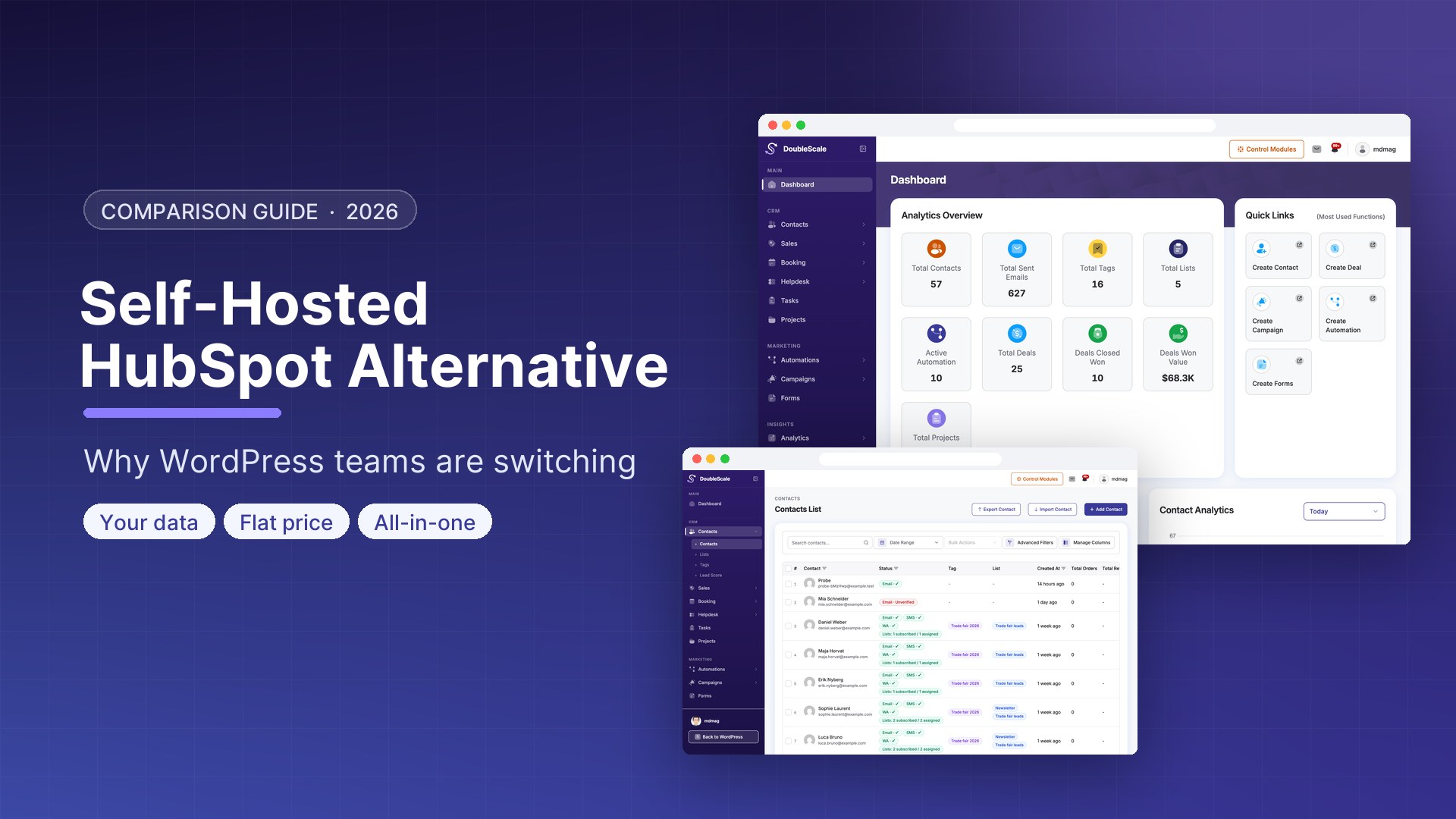
The most compelling alternative for WordPress-based businesses is not another SaaS tool — it is running a self-hosted CRM inside your own WordPress installation. This guide explains why, compares the available options, and walks through exactly how DoubleScale Pro works as a self-hosted HubSpot alternative.
What HubSpot Costs in Practice
HubSpot’s free tier is genuinely useful, which is why so many businesses start with it. But the free-to-paid gap is enormous:
| Feature | HubSpot Free | HubSpot Starter | HubSpot Pro |
|---|---|---|---|
| Users | Up to 2 | Up to 10 | Per seat |
| Email marketing | 2,000 emails/month | 5x contacts/month | Unlimited |
| Marketing automation | No | No | Yes |
| Custom reports | No | No | Yes |
| Multiple deal pipelines | No (1 only) | No | Yes |
| A/B testing | No | No | Yes |
| Monthly cost | Free | $20/seat/month (list) | $90/seat/month |
The features that make HubSpot genuinely powerful — marketing automation, custom reporting, A/B testing — are locked behind the Professional plan at $90 per seat a month. Many businesses pay for HubSpot Starter ($20/seat/month) believing it provides automation, only to discover that automation requires Professional.
What a Self-Hosted HubSpot Alternative Looks Like
Comparing several options? Our sister site compares ten self-hosted HubSpot alternatives, including open-source CRMs outside WordPress. This page focuses on DoubleScale versus HubSpot.
A self-hosted CRM and marketing automation platform runs on your own server — in this case, as a WordPress plugin. Rather than paying a monthly fee to a SaaS company for access to your own data, you pay a one-time or annual flat fee for software licencing, and the software runs on hosting you already pay for.
The key advantages:
- No per-seat pricing: Add 50 team members with no additional monthly cost
- No per-contact pricing: Your contact list can grow to 100,000+ contacts without triggering a pricing tier increase
- Data ownership: All contact data, email history, automation logs, and analytics live in your own database. No vendor lock-in.
- WordPress integration: Native access to WooCommerce orders, form submissions, booking records, and all other WordPress data — without API sync delays or limitations
- Flat annual cost: A predictable, fixed annual licence fee that does not escalate with your growth
The trade-offs:
- You manage the infrastructure: Plugin updates, WordPress security, and hosting performance are your responsibility
- Less advanced automation logic: For very complex enterprise automation scenarios, HubSpot’s conditional logic is still more sophisticated
- No built-in telephony: HubSpot includes calling and call recording; WordPress plugins do not
For the vast majority of small and medium businesses, the trade-offs favour the self-hosted approach overwhelmingly when cost and data ownership are factors in the decision.
DoubleScale Pro: A Feature-by-Feature HubSpot Comparison
CRM and Contact Management
| Feature | HubSpot Pro | DoubleScale Pro |
|---|---|---|
| Contact records with activity timeline | Yes | Yes |
| Custom contact properties/fields | Yes | Yes (unlimited) |
| Company records | Yes | Yes |
| Contact segmentation and lists | Yes | Yes |
| Tags | Yes | Yes |
| Deal pipelines | Yes (multiple, Pro+) | Yes (multiple) |
| Sales pipeline Kanban board | Yes | Yes |
| Deal forecasting | Yes | Basic |
| Lead scoring | Yes (Pro+) | Yes |
| Contact import/export | Yes | Yes |
Email Marketing
| Feature | HubSpot Pro | DoubleScale Pro |
|---|---|---|
| Drag-and-drop email builder | Yes | Yes |
| Email templates | Yes (large library) | Yes |
| Bulk campaigns to segments | Yes | Yes |
| Personalisation merge tags | Yes (extensive) | Yes |
| A/B subject line testing | Yes | Roadmap |
| Predictive send time | Yes | No |
| Open and click tracking | Yes | Yes |
| Email sending limit | Unlimited | Unlimited (SMTP dependent) |
Marketing Automation
| Feature | HubSpot Pro | DoubleScale Pro |
|---|---|---|
| Visual workflow builder | Yes | Yes |
| Conditional branching | Yes (very advanced) | Yes |
| Email triggers | Yes | Yes |
| Form triggers | Yes | Yes |
| Purchase/WooCommerce triggers | Via HubSpot-WC extension | Yes (native) |
| SMS automation | No (third party) | Yes (native Pro) |
| WhatsApp automation | No | Yes (native Pro) |
| Booking triggers | Via HubSpot Meetings | Yes (native) |
| Webhook actions | Yes | Yes |
Additional Platform Features
| Feature | HubSpot Pro | DoubleScale Pro |
|---|---|---|
| Helpdesk / ticketing | Service Hub (separate plan) | Yes (included) |
| Invoicing | Commerce Hub add-on | Yes (included) |
| Appointment booking | Basic (Meetings tool) | Full booking module (included) |
| Live chat | Yes (Conversations) | Basic (via plugin ecosystem) |
| Content management | CMS Hub (separate) | WordPress CMS (your platform) |
| Data location | HubSpot servers | Your server |
| Per-seat pricing | Yes (scales with team size) | No |
| Per-contact pricing | Yes (scales with list size) | No |
The Annual Cost Comparison
Let us compare total annual costs for a realistic small business with 5 team members and 10,000 contacts, using full marketing automation:
HubSpot:
- HubSpot Professional (advanced automation): $90/seat × 5 seats = $450/month
- Total: $5,400/year (billed annually, before add-ons and credits)
DoubleScale Pro:
- DoubleScale Pro: $99/year per site, unlimited users and contacts (see plans)
- SMTP service (e.g., Amazon SES for 10k emails/month): approximately $1–3/month
- No per-seat fee, no per-contact fee
- Total: flat annual licence + minimal SMTP costs
The annual savings compared to HubSpot Pro, at this scale, are substantial — and they compound as your team grows and your contact list grows, because DoubleScale’s pricing does not scale with either.
What HubSpot Still Does Better
An honest comparison must acknowledge where HubSpot remains genuinely superior:
Conditional automation logic: HubSpot’s automation builder has more granular conditional logic, more advanced branching options, and a more powerful visual editor for very complex enterprise automation workflows. For most small and medium businesses, DoubleScale Pro’s automation capabilities are sufficient, but enterprise teams with very sophisticated automation needs will find HubSpot’s engine more flexible.
Predictive analytics and AI: HubSpot has invested significantly in AI-driven features: predictive lead scoring, email send-time optimisation, content recommendations, and conversation intelligence. These features are not yet available in DoubleScale Pro.
Built-in telephony: HubSpot includes VOIP calling, call recording, and call transcription. WordPress-based CRMs do not include this — you would need a separate telephony tool (Twilio, JustCall, etc.) integrated via webhook.
Native integrations library: HubSpot has hundreds of native integrations with sales tools, advertising platforms, and third-party SaaS apps. DoubleScale Pro integrates natively with the WordPress ecosystem; external integrations use webhooks or Zapier.
Support and documentation: HubSpot’s customer support, documentation, community, and certification programme are best-in-class. DoubleScale Pro’s support and documentation, while solid, does not yet match HubSpot’s scale.
How to Migrate from HubSpot to DoubleScale Pro
For businesses moving from HubSpot to a self-hosted WordPress CRM, the migration process is straightforward:
Step 1: Export HubSpot Data
- Go to HubSpot → Contacts → Actions → Export
- Export all contacts with all properties (this generates a CSV download)
- Go to HubSpot → CRM → Deals → Actions → Export (export deal data separately)
- Note which HubSpot properties (custom fields) you are actively using — you will need to recreate these as custom fields in DoubleScale
Step 2: Prepare DoubleScale Pro
- Install DoubleScale Pro on your WordPress site
- Enable the modules you need (Email Marketing, Automation, Helpdesk, etc.) from DoubleScale → Modules
- Go to DoubleScale → CRM → Custom Fields → Add Field — recreate each HubSpot property you use as a DoubleScale custom field (use the same field names for easy CSV mapping)
- Create your contact lists and tags to mirror your HubSpot segments
Step 3: Import Contacts
- Go to DoubleScale → Contacts → Import → CSV Import
- Upload your HubSpot contacts export
- Map each CSV column to the corresponding DoubleScale field
- Review the import preview and confirm
- After import, apply appropriate tags and list assignments to recreate your HubSpot segments
Step 4: Rebuild Key Automations
List your top 5 HubSpot workflows by business impact. Rebuild each one in DoubleScale’s automation builder. The trigger types and action types are comparable for most common use cases. More complex HubSpot workflows may need to be simplified or split into multiple DoubleScale automations.
Step 5: Update WordPress Forms and Integrations
- Replace HubSpot form embeds with DoubleScale form blocks or shortcodes
- Update any Zapier or Webhook integrations to point to DoubleScale’s webhook endpoints
- Remove the HubSpot WordPress plugin after verifying DoubleScale is capturing all leads correctly
Who Should Make This Switch
A self-hosted DoubleScale Pro is the right move if:
- You are currently paying for HubSpot Pro and using primarily email marketing and basic automation — you are paying $90 per seat a month for features you could get for a fraction of the cost
- You are on HubSpot Free and constantly hitting the walls of what free provides — especially if automation is the key thing you need
- You run a WordPress site and want your CRM data connected to your WooCommerce store, booking system, and forms natively
- Your team has grown and HubSpot’s per-seat pricing is becoming a significant line item
- You want your contact data to remain on your own server for compliance, security, or data sovereignty reasons
A self-hosted solution is the wrong choice if:
- You are a large enterprise with very complex automation workflows that require HubSpot’s advanced conditional logic
- You rely heavily on HubSpot’s native integrations with specific third-party tools
- You need built-in telephony and call recording
- You do not have internal or freelance WordPress technical support to manage your site
Conclusion
For WordPress-based small and medium businesses, DoubleScale Pro provides the core functionality that makes HubSpot valuable — CRM, email marketing, marketing automation, helpdesk, invoicing, and booking — at a fraction of the annual cost, with your data on your own server.
HubSpot remains the better choice for enterprise teams with very complex automation needs, built-in telephony requirements, or deep third-party integration requirements. For everyone else, the annual cost comparison is difficult to argue with.
See the full feature set and pricing at doublescale.io/pricing, or install the free version at WordPress.org to explore the CRM before upgrading.
Get our guides first on GoogleAdd DoubleScale as a preferred source and our articles show up more often in your Top Stories.

Mohamed Magdy, Founder & CEO, DoubleScale
Mohamed Magdy is the founder and CEO of DoubleScale, the all-in-one CRM for WordPress. He writes about CRM, email marketing and automation for WordPress businesses.
Practical CRM tips, once a month
Guides on growing with WordPress: lead capture, email marketing, automations and sales. No spam, unsubscribe anytime.