On this page
- The short version
- How the three compare
- Round 1: Getting your first email out
- Round 2: Writing the newsletter
- Round 3: Automation
- Round 4: Cost at 10,000 subscribers
- Round 5: When newsletters are not the whole job
- Round 6: Growing the list
- Round 7: Teams and permissions
- Switching to DoubleScale
- Where DoubleScale is not the right fit
- Pick by situation
- FAQ
If you have already decided that your email list belongs inside WordPress, not on someone else’s platform, the shortlist usually narrows to plugins. MailPoet and The Newsletter Plugin are the two most installed. DoubleScale, which we build, is the third option people add once they realise they need a CRM as well.
All three store subscribers in your own database. What separates them is who handles sending, how far automation goes, and what happens to your bill as the list grows.
Full disclosure: we make DoubleScale. We have kept the two other tools’ strengths in, quoted every price from their own pricing pages, and listed the cases where DoubleScale is the wrong choice.
In this MailPoet vs Newsletter Plugin vs DoubleScale comparison we look at setup, writing, automation, cost and what happens when you need more than newsletters.
The short version
Its own sending service means no SMTP to configure. Free up to 500 subscribers, then priced by list size.
Unlimited subscribers in every version; pay only for add-ons. You handle delivery yourself.
Unlimited contacts, a visual automation builder and sales, booking and support tools on the same contact.
How the three compare
| MailPoet | The Newsletter Plugin | DoubleScale | |
|---|---|---|---|
| WordPress.org installs | 500,000+ | 200,000+ | New (5.0★) |
| Free limits | 500 subscribers on its sending service (1,000 with your own) | None | None on contacts |
| Paid pricing | From $10/mo by subscribers | $69 / $140 / $420 a year by sites | $99 / $199 / $399 a year by sites |
| Sending | Built-in service or your SMTP | Host, SMTP plugin or delivery add-ons | 20+ providers with fallback |
| Automation | Welcome, post notifications, WooCommerce | Add-ons: Automated, Autoresponder | Visual workflow builder |
| Beyond email | WooCommerce emails | WooCommerce segments (Professional) | Deals, invoices, bookings, helpdesk |
Round 1: Getting your first email out
MailPoet is the fastest from install to first newsletter. A wizard walks you through it, and switching on the MailPoet Sending Service skips the technical part entirely.
The Newsletter Plugin sends through whatever WordPress uses, so for real deliverability you add an SMTP plugin or one of its delivery add-ons. SMTP2Go, SendPulse, SMTP.com and Brevo connectors are free; Amazon SES, Mailgun, SendGrid and Postmark are premium.
DoubleScale has sending built into the plugin, but you bring the provider. Connect one or several (Amazon SES, Brevo, Mailgun, SendGrid, Postmark, Gmail, Outlook and more), pick a default and a fallback, and every email is logged.
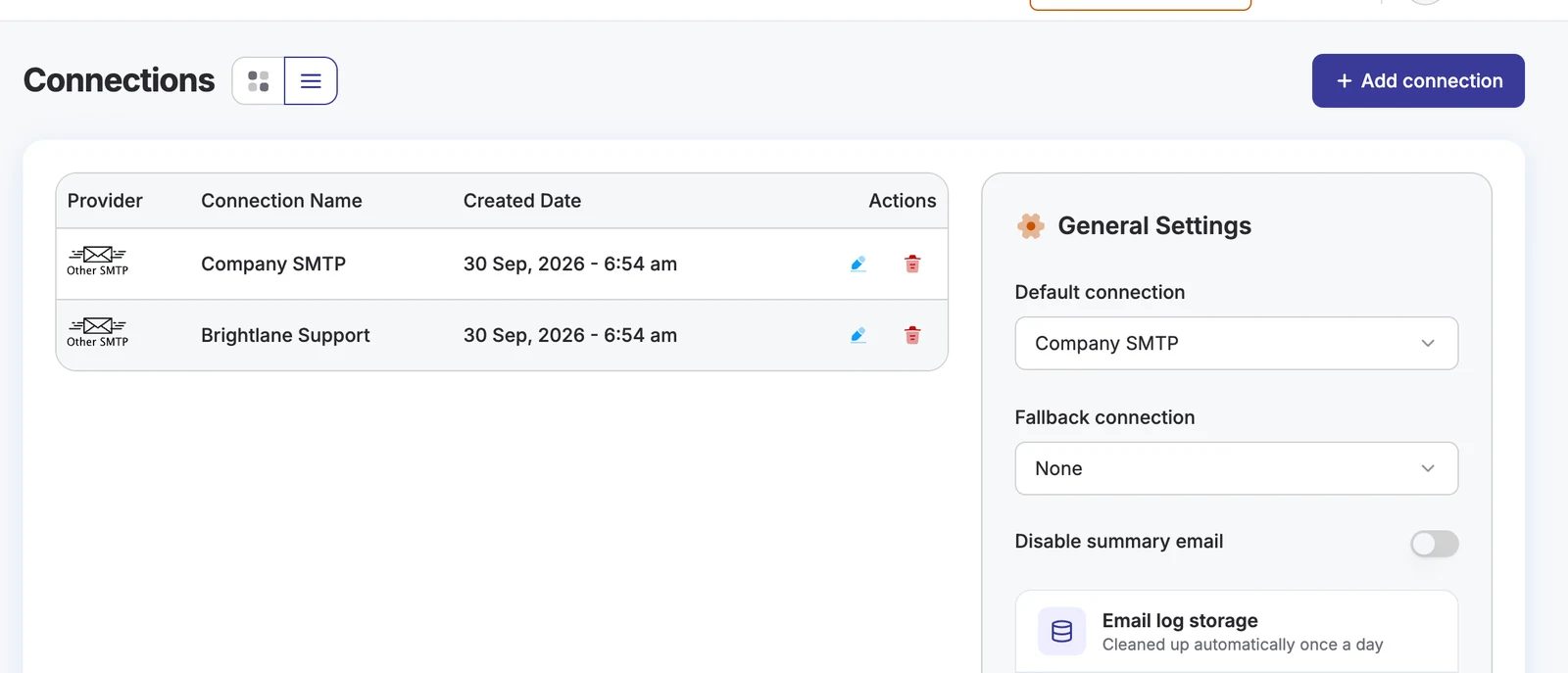
Round winnerMailPoet for zero-setup sending.
Round 2: Writing the newsletter
MailPoet’s drag-and-drop editor and 70+ templates are the most beginner-friendly. The Newsletter Plugin’s composer is block-based and capable, inside a denser admin. DoubleScale’s builder gives you text and button blocks with merge-tag fallbacks for free, and Pro adds images, products, timers, video, saved sections and a template library.
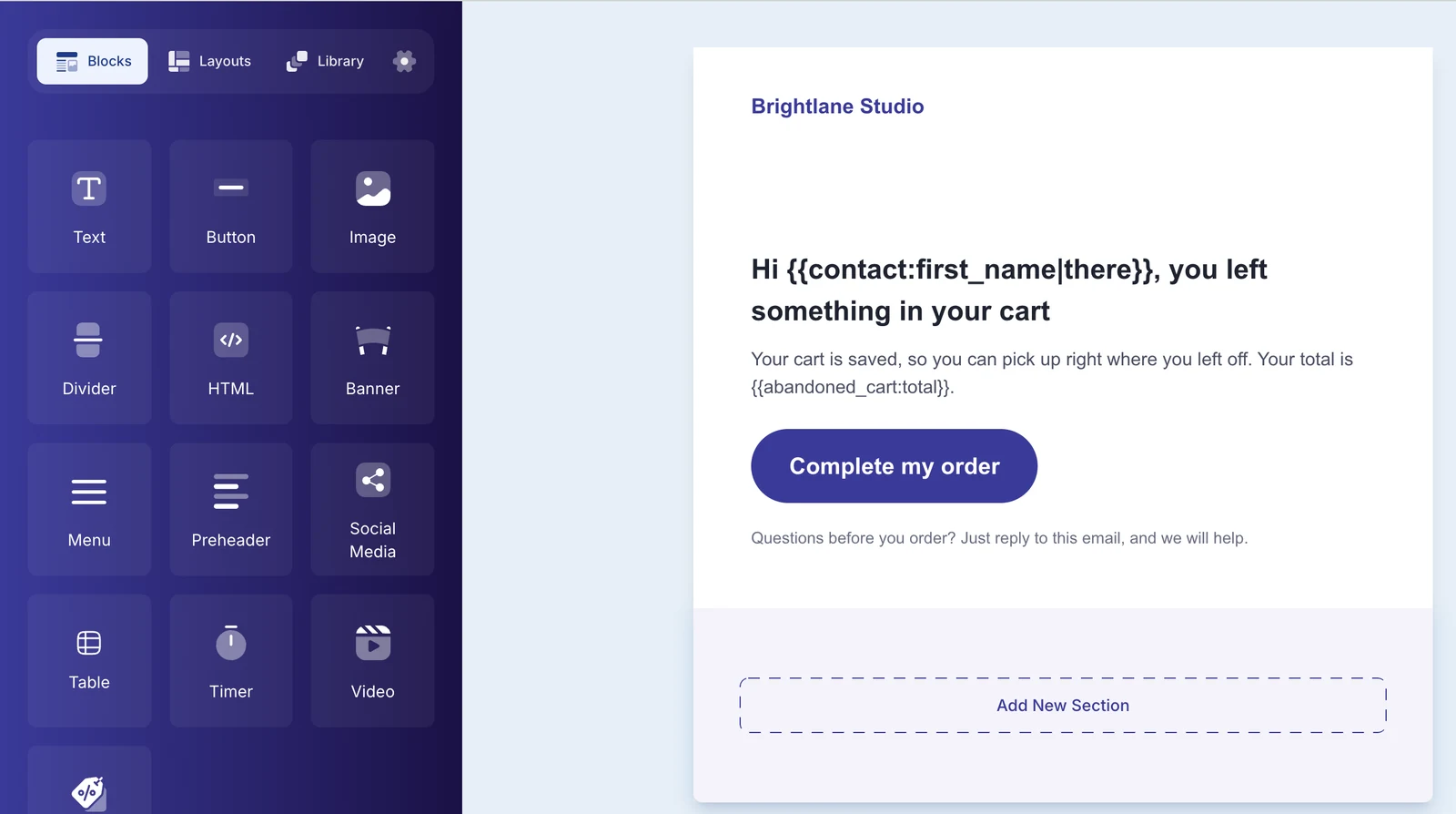
Round winnerMailPoet
Round 3: Automation
MailPoet’s automations cover welcome emails, post notifications and WooCommerce flows, with custom triggers and branching on paid plans. The Newsletter Plugin automates through add-ons: Automated builds post digests, Autoresponder sends email series; both are in the Professional plan.
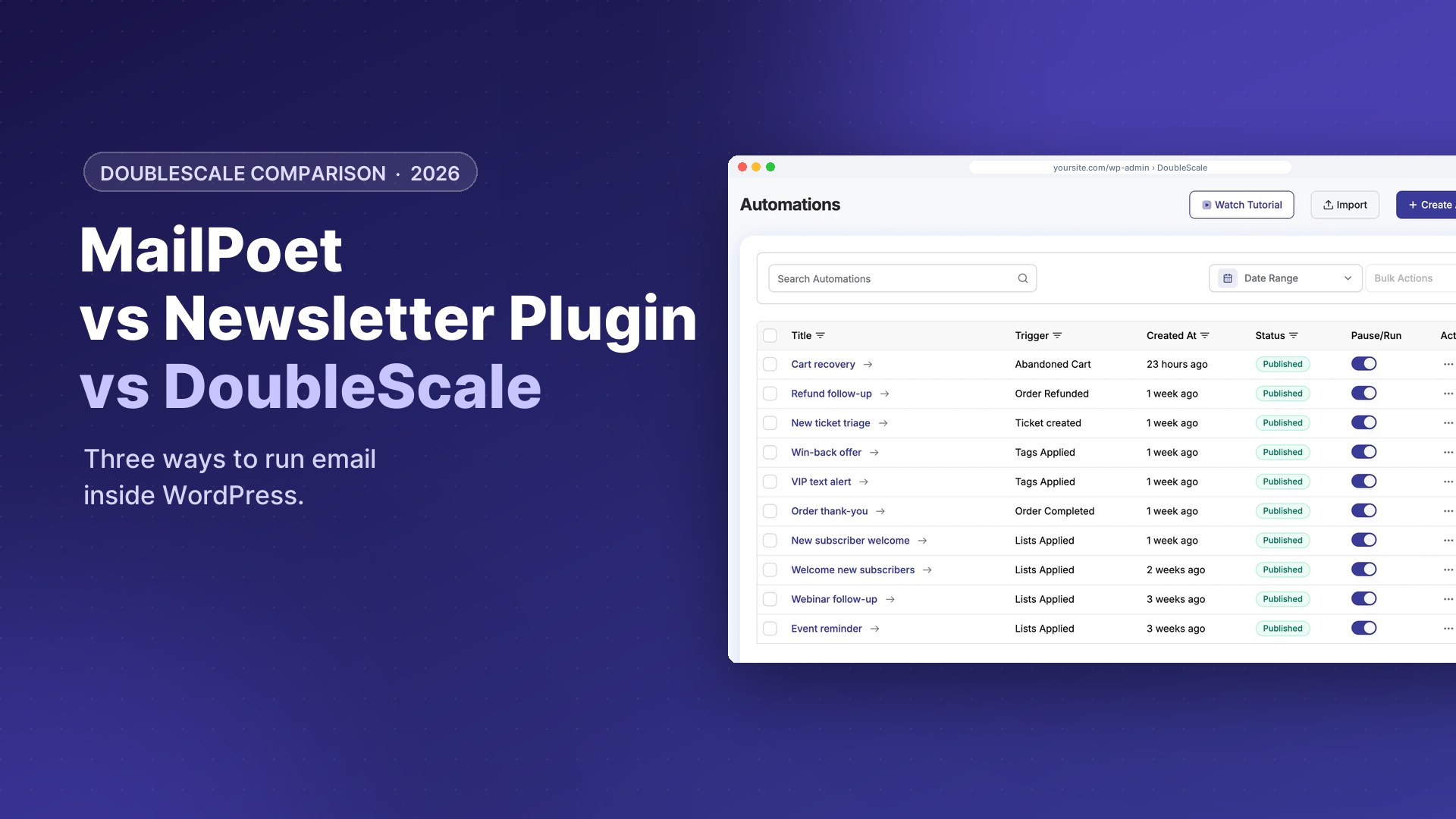
DoubleScale gives you a visual workflow builder. On the free plugin it handles tags, lists and contact updates; Pro adds email and sequence actions, conditions, and triggers from WooCommerce, forms, deals, bookings, tickets, LMS and membership plugins. Here is a working set of automations on a test site.
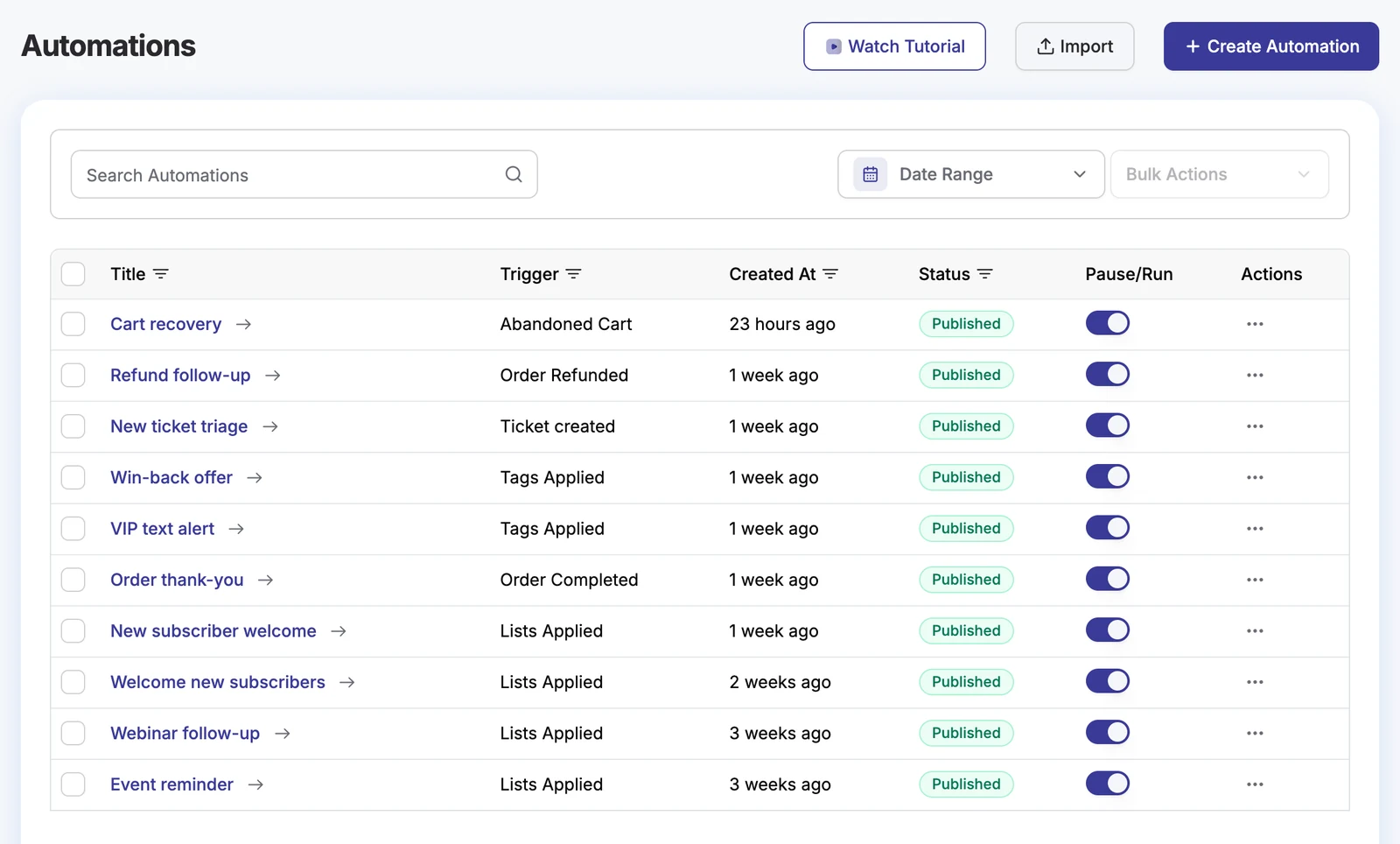
Round winnerDoubleScale for the range of triggers; MailPoet for simple newsletter automation.
Round 4: Cost at 10,000 subscribers
| List size | MailPoet Business | Newsletter Pro + SES | DoubleScale Basic + SES |
|---|---|---|---|
| 500 | $120/yr | $142/yr | $101/yr |
| 2,500 | $360/yr | $152/yr | $111/yr |
| 10,000 | $960/yr | $188/yr | $147/yr |
Yearly cost on monthly billing, 4 campaigns a month to the whole list. Vendor pricing pages, checked October 17, 2026. DoubleScale includes Amazon SES at $0.10 per 1,000 emails.
Four campaigns a month. Both per-site plugins pay Amazon SES about $0.10 per 1,000 emails.
The two per-site plugins land close together. The difference is what the licence buys: newsletter add-ons on one side, a CRM with automations, sales and support on the other.
Round winnerThe Newsletter Plugin and DoubleScale
Round 5: When newsletters are not the whole job
Neither MailPoet nor The Newsletter Plugin tries to be a CRM. DoubleScale does: each contact has a timeline with emails, SMS, WhatsApp, calls, deals, proposals, invoices, bookings and tickets, and the free plugin already includes proposals, invoices, bookings, a client portal and a helpdesk inbox.
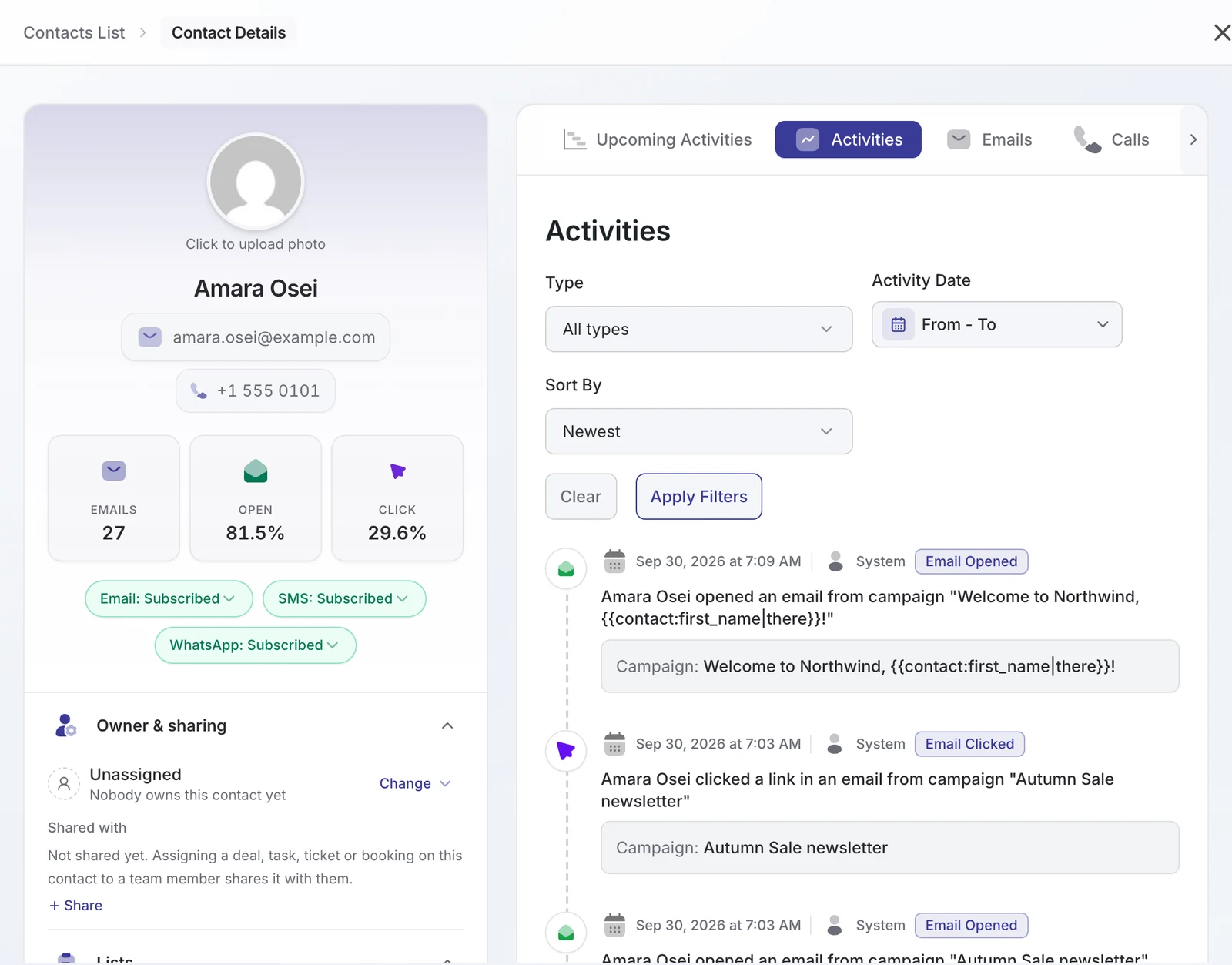
Round winnerDoubleScale
Round 6: Growing the list
MailPoet and The Newsletter Plugin both have their own subscription forms: MailPoet with popups, fixed bars and blocks, The Newsletter Plugin with widgets, shortcodes and integrations for third-party form plugins. DoubleScale does not ship a separate newsletter form builder; it connects to the form plugin you already use (Contact Form 7, WPForms, Fluent Forms and Quill Forms on free, 13 more on Pro) and adds the subscriber, tags and lists automatically.
Round winnerMailPoet for built-in forms.
Round 7: Teams and permissions
MailPoet allows unlimited users through WordPress roles. The Newsletter Plugin relies on WordPress capabilities. DoubleScale has its own roles per module: campaign and automation managers and agents on the free plugin, and CRM manager and agent roles on Pro, so a marketing assistant can run campaigns without seeing invoices.
Round winnerDoubleScale
Switching to DoubleScale
- Install DoubleScale free and connect a sending provider such as Amazon SES or Brevo.
- Export your subscribers from MailPoet or The Newsletter Plugin as CSV, keeping only confirmed subscribers.
- Import them into DoubleScale with lists and tags mapped.
- Connect your form plugin so new sign-ups land in DoubleScale.
- Recreate your welcome email and deactivate the old plugin once the first campaign is out.
Where DoubleScale is not the right fit
- There is no built-in sending service. You connect your own provider (Amazon SES, Brevo, Mailgun, SendGrid, Postmark and more) and add its DNS records once.
- No A/B testing yet.
- We are new on WordPress.org, so there are fewer tutorials and community answers than for the big names.
- Automations that send email, sequences, automated campaigns, WooCommerce triggers, SMS and WhatsApp need a Pro plan (from $99 a year). The free automation builder handles tags, lists and contact updates.
- If you run a content site and only send newsletters, The Newsletter Plugin or MailPoet will feel lighter.
Pick by situation
| Situation | Pick |
|---|---|
| First newsletter, no technical help | MailPoet |
| Large content list, minimal budget, SMTP experience | The Newsletter Plugin |
| A business that sells, books or supports customers | DoubleScale |
| WooCommerce store wanting quick store emails | MailPoet |
| Unlimited contacts plus visual automation | DoubleScale |
For the two-way view, see MailPoet vs Newsletter Plugin on the Quill Forms blog.
How we compared: prices were read on each vendor’s pricing page on October 17, 2026 (USD, monthly billing unless noted); the cost examples assume 4 campaigns a month to the whole list; DoubleScale screenshots are from DoubleScale 1.6 on a test site.
FAQ
Which WordPress newsletter plugin has no subscriber limits?
The Newsletter Plugin and DoubleScale both allow unlimited subscribers in their free versions. MailPoet’s free plan covers 500 subscribers on its sending service, or 1,000 with your own.
Is DoubleScale a newsletter plugin?
It includes newsletters (standard campaigns, a drag-and-drop builder, lists, tags and double opt-in) but it is a full CRM, with deals, invoices, bookings and a helpdesk in the same plugin.
Do I need SMTP for these plugins?
For good deliverability, yes, unless you use MailPoet’s Sending Service. The Newsletter Plugin and DoubleScale both send through a provider you connect, such as Amazon SES or Brevo.
Which is best for WooCommerce?
MailPoet has the quickest WooCommerce setup. DoubleScale Pro adds WooCommerce triggers, abandoned cart recovery and SMS/WhatsApp. The Newsletter Plugin’s WooCommerce integration is in its Professional plan.
Does DoubleScale have subscription forms?
DoubleScale connects to your existing form plugin instead of shipping its own newsletter form builder: Contact Form 7, WPForms, Fluent Forms and Quill Forms on free, and 13 more on Pro.
Which plugin is lightest on a small site?
The Newsletter Plugin and MailPoet are focused on email, so they add less to the admin. DoubleScale lets you switch off modules you do not use, such as booking or helpdesk.
Unlimited contacts on every plan. Start free and add automations when you need them.

Mohamed Magdy, Founder & CEO, DoubleScale
Mohamed Magdy is the founder and CEO of DoubleScale, the all-in-one CRM for WordPress. He writes about CRM, email marketing and automation for WordPress businesses.
Practical CRM tips, once a month
Guides on growing with WordPress: lead capture, email marketing, automations and sales. No spam, unsubscribe anytime.