On this page
- What a WordPress task tool has to do
- Quick comparison
- 1. DoubleScale Pro — best WordPress task management inside a CRM
- 2. Asana — still the default when the CRM is somewhere else
- 3. ClickUp — more surface area than a WordPress site needs
- 4. WP Project Manager — tasks inside projects, not a CRM
- 5. Fluent Boards — Trello in WordPress
- How to run tasks in DoubleScale (the actual workflow)
- How to choose
- Frequently asked questions
Most WordPress teams do not have a task problem. They have a context problem. The follow-up lives in Asana. The deal lives in a CRM. The customer email lives in Gmail. By the time someone asks “did we call them?”, nobody can see the contact, the pipeline, and the to-do on the same screen.
If you searched for a WordPress task management plugin, you are usually choosing between three stacks:
- A SaaS board (Asana, ClickUp, Monday) that is excellent at work — and completely disconnected from WordPress contacts, WooCommerce orders, and your sales pipeline.
- A WordPress project plugin (WP Project Manager, Fluent Boards) that stores tasks on your site — but treats them as isolated to-dos, not CRM follow-ups.
- A CRM that can create tasks on the contact and deal, with reminders, Kanban, and automations that fire when a lead moves.
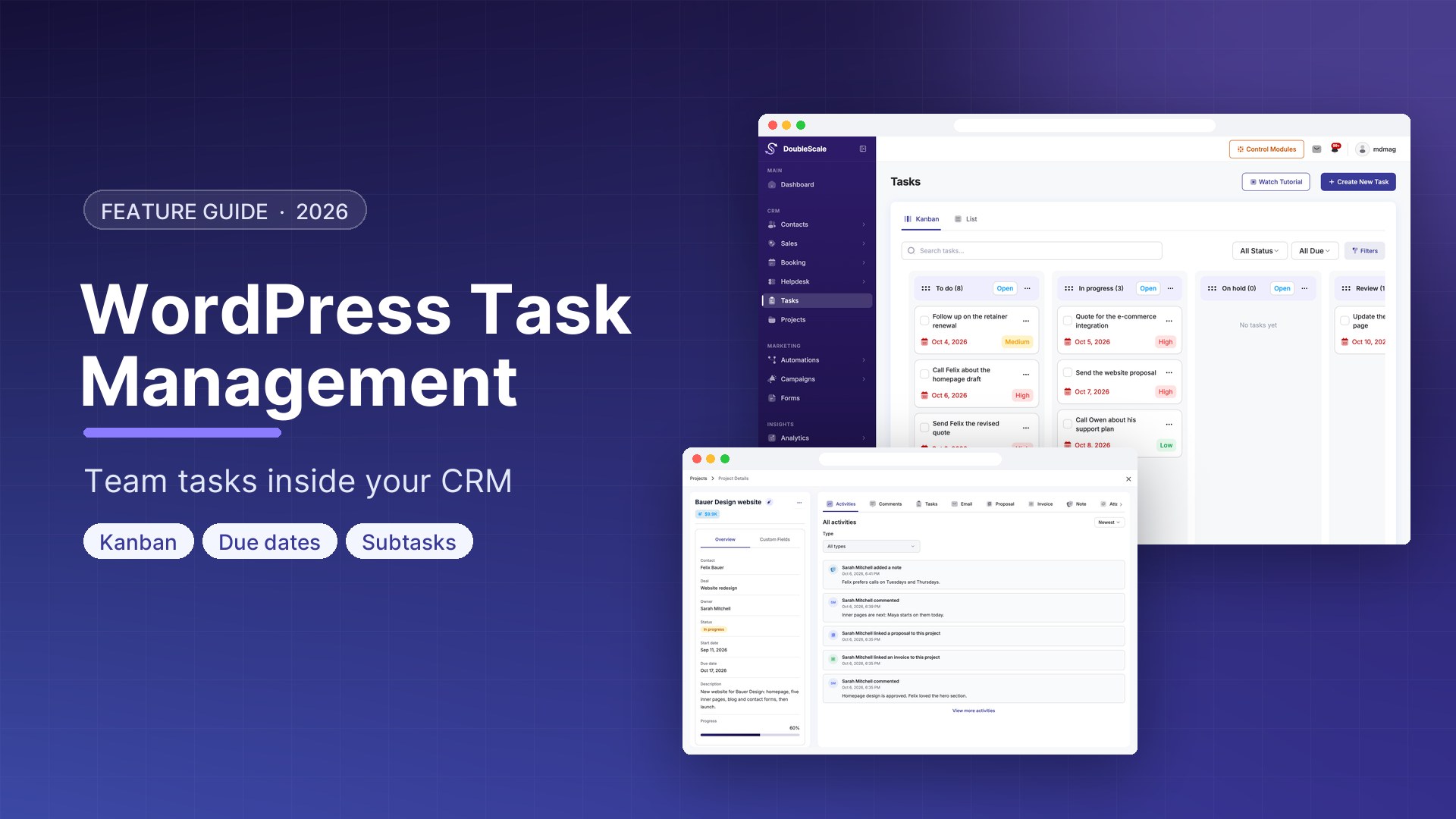
DoubleScale is the third option. Tasks ship in DoubleScale Pro: assignees, due dates, Kanban columns, subtasks, recurrence, and reminders — linked to the same contacts, deals, and projects your team already uses. The iOS and Android apps open those tasks on the phone, with push when something is due.
Here is how WordPress task management actually compares in 2026.
What a WordPress task tool has to do
A checklist plugin is not task management for a sales or agency team. For this comparison, the tool has to cover the job a rep or account manager would otherwise open Asana to do:
- Assign a WordPress user, set a due date (and time), and mark priority
- Type the work as a call, email, meeting, to-do, or follow-up — not a generic card
- See tasks on a list and a Kanban board with columns you control
- Attach the task to a contact, a deal, or a project
- Break work into grouped subtasks, add comments, and attach files
- Remind the assignee automatically; recur the ones that repeat every week
- Let automations create or complete tasks when a form is submitted, a deal moves, or a ticket is opened
Asana does the first half of that list extremely well. Almost no WordPress plugin does the second half — CRM context — without a Zapier tax.
Quick comparison
| Tool | Runs in WordPress? | CRM-linked tasks | Kanban + list | Reminders / recurrence | Typical cost |
|---|---|---|---|---|---|
| DoubleScale Pro | Yes — self-hosted plugin | Yes — contacts, deals, projects | Yes — custom status columns | Yes — due time, reminders, recurring clones | Pro from $99/year, unlimited contacts |
| Asana | No | No (unless you glue it with Zapier) | Yes — best-in-class | Yes | Per-seat SaaS |
| ClickUp | No | No | Yes — docs, sprints, docs overload | Yes | Per-seat SaaS |
| WP Project Manager | Yes | No native CRM | Yes (tasks inside projects) | Limited vs a dedicated CRM | Free + paid add-ons |
| Fluent Boards | Yes | Optional FluentCRM glue | Yes — Trello-style | Depends on plan | Free + Pro |
| Todoist / Google Tasks | No | No | Lists, not a CRM board | Yes | Freemium / Google Workspace |
1. DoubleScale Pro — best WordPress task management inside a CRM
DoubleScale’s task module is not a standalone to-do app bolted onto WordPress. It is a Pro module that stores tasks on your server, next to contacts and deals.
Each task has:
- A required assignee (WordPress user) and due date, with an optional due time
- Priority — low, medium, or high
- A type — call, email, meeting, to-do, or follow-up — so a sales day is not a wall of identical cards
- A Kanban status (To Do / In Progress / Done by default; you can add columns)
- Optional links to a contact, a deal, or a project
From there the Pro module adds the pieces teams actually use after week one:
- Subtasks in groups, with their own due dates and notes
- Labels, comments, activity history, and file attachments (up to 20 files per task)
- Recurring tasks that clone on a schedule so you do not rebuild the same weekly check-in
- Reminders fired by Action Scheduler, plus in-app / email notifications and mobile push to the task
- Due dates on the staff calendar
- Automations — create or complete a task when something happens in the CRM (new contact, deal stage, form submit, overdue, and so on)
Sales reps see the tasks assigned to them. Managers see a broader set. Tasks also appear on the contact record, so you are not hunting a board named “Follow-ups Q3” to remember who promised a call.
What it is not: Jira, ClickUp, or a client-facing task portal. There are no sprints, dependency graphs, or timesheets. If your company lives in engineering tickets, keep Jira. If your company lives in “call this lead Tuesday at 10,” DoubleScale is the WordPress tool that matches the job.
Download DoubleScale free · Launch a demo · See Pro pricing
2. Asana — still the default when the CRM is somewhere else
Asana is excellent at work: assignees, due dates, rules, workload, portfolios. The gap is location. Contacts are not WordPress users. WooCommerce orders never appear on a task. A closed-won deal in HubSpot or Pipedrive does not automatically become “onboard this client” unless you maintain Zapier.
Choose Asana if project ops is the company, and WordPress is only the website. Choose a WordPress task plugin if the website is the operating system.
3. ClickUp — more surface area than a WordPress site needs
ClickUp can replace docs, sprints, whiteboards, and goals. That is the pitch and the problem. For a 5–20 person WordPress agency, you pay per seat for a platform you will use as a fancy to-do list. It will not know your DoubleScale (or FluentCRM) contact unless you integrate it.
4. WP Project Manager — tasks inside projects, not a CRM
weDevs’ WP Project Manager is the classic self-hosted answer: projects, task lists, Kanban, clients as WordPress users. It is a legitimate project plugin. It is not a CRM. There is no native deal pipeline, no contact timeline of emails and tickets, no “create a task when this Gravity Form submits and tag the contact.”
Use it if you only need project task lists on WordPress and already have a separate CRM. Skip it if you wanted one plugin for people + pipeline + work.
5. Fluent Boards — Trello in WordPress
Fluent Boards is a clean Kanban plugin. If you already run FluentCRM, you can connect some dots. If you wanted one product for contacts, deals, tasks, projects, and helpdesk, you are assembling a Fluent stack instead of replacing Asana.
How to run tasks in DoubleScale (the actual workflow)
- Enable the Tasks module in DoubleScale Pro (Settings → Modules). The free plugin shows the Tasks toggle; the full module is Pro.
- Open Tasks in the DoubleScale app. Use list view for “what is due today” and Kanban when you want columns.
- Create a task with a title, type, assignee, due date, and priority. Attach it to the contact or deal it belongs to — that is the whole point.
- Add subtasks if the work has steps. Set a reminder if missing the due time is expensive.
- Turn on an automation: for example, form submitted → create a follow-up task for the sales owner.
Overdue, due today, and upcoming are computed from the due date, so the board does not depend on someone dragging a card to “Late.”
How to choose
- If tasks must sit on the same contact as emails, deals, and tickets, pick a CRM-native tool (DoubleScale Pro), not Asana.
- If you need sprints, Gantt, and capacity planning, pick ClickUp or Jira — WordPress plugins are not that category.
- If you only need a board for website content or internal chores, Fluent Boards or WP Project Manager is enough.
- If the field team works from a phone, confirm there is a native mobile app, not a bookmark to wp-admin.
For most WordPress agencies and product companies, the winning setup is not “Asana + a CRM.” It is tasks that are born from the CRM record.
Download DoubleScale free · Launch a demo · iOS app · Android app
Frequently asked questions
Is there a WordPress task management plugin that works like Asana?
Several plugins offer Kanban and assignees inside WordPress. The difference is whether a task is attached to a CRM contact and deal. DoubleScale Pro is built that way: list + Kanban, reminders, subtasks, and recurrence, on the same record as your pipeline. It is not a full Asana replacement for large product orgs.
Does DoubleScale include tasks in the free plugin?
Helpdesk/ticketing ships in the free DoubleScale plugin. The Tasks module — Kanban, reminders, subtasks, recurrence, deal/project links — is part of DoubleScale Pro.
Can I assign WordPress users and set due dates?
Yes. Every task requires an assignee and a due date. You can add a due time, a reminder, labels, comments, and files. Types cover call, email, meeting, to-do, and follow-up.
Can tasks be automated from forms or WooCommerce?
Yes. Automations can create or complete tasks when CRM events fire — including form submissions and other contact/deal triggers. There is no direct task↔order database link; WooCommerce flows go through the contact and automation rules.
Do clients see the task board?
No. Tasks are a staff surface (admin app, contact/deal/project views, calendar, mobile). Clients see projects and tickets in the client portal, not the internal task Kanban.
How is this different from project management?
A task is a single action with an owner and a due date. A project is the delivery container: Kanban statuses, budget, dates, client access, and a list of tasks that roll into progress. Use tasks for sales follow-ups; use projects when you are delivering work to a client.

Mohamed Magdy, Founder & CEO, DoubleScale
Mohamed Magdy is the founder and CEO of DoubleScale, the all-in-one CRM for WordPress. He writes about CRM, email marketing and automation for WordPress businesses.
Practical CRM tips, once a month
Guides on growing with WordPress: lead capture, email marketing, automations and sales. No spam, unsubscribe anytime.