On this page
- The 30-second verdict
- Three different ideas of "email marketing"
- Side by side
- What you pay as your list grows
- Round 1: Building the email
- Round 2: Choosing who gets it
- Round 3: Automation
- Round 4: Sending and deliverability
- Round 5: Reports
- Round 6: Everything beyond email
- Round 7: Forms and list growth
- Round 8: Privacy and data ownership
- When DoubleScale is the wrong choice
- Which one should you choose?
- Moving from MailPoet or Mailchimp to DoubleScale
- FAQ
Most “MailPoet vs Mailchimp” articles stop at two options: the plugin that lives in WordPress, or the platform that lives outside it. We think there is a third question worth asking before you pick either: is email the only thing you need to manage?
That is where DoubleScale comes in. It is a WordPress CRM we build, with email marketing as one part of it. So in this comparison we put all three side by side: MailPoet, Mailchimp and DoubleScale, round by round, with real screenshots and prices checked on October 17, 2026.
Full disclosure: we make DoubleScale. We have kept the two other tools’ strengths in, quoted every price from their own pricing pages, and listed the cases where DoubleScale is the wrong choice.
This MailPoet vs Mailchimp vs DoubleScale comparison is written for WordPress site owners deciding where their list should live.
The 30-second verdict
Pick it if you want simple newsletters, post notifications and WooCommerce emails, with sending handled for you.
Pick it if you need A/B testing, predictive segments and a platform that is not tied to one website.
Pick it if the same contacts also need deals, quotes, invoices, bookings or support, and you want unlimited contacts at a flat price.
Three different ideas of "email marketing"
- MailPoet is a newsletter plugin made by the WooCommerce team. Subscribers are WordPress data, and its own sending service removes the SMTP setup.
- Mailchimp is a hosted marketing platform owned by Intuit. It connects to WordPress through plugins, and your audience lives on Mailchimp’s servers.
- DoubleScale is a CRM that runs inside WordPress. Email campaigns, automations and sequences sit next to contacts, deals, proposals, invoices, bookings and a helpdesk, all on one contact timeline.
Side by side
| MailPoet | Mailchimp | DoubleScale | |
|---|---|---|---|
| Runs | Inside WordPress | On Mailchimp’s servers | Inside WordPress |
| Free plan | 500 subscribers, 5,000 emails/mo | 250 contacts, 500 emails/mo | Unlimited contacts, standard campaigns |
| Paid pricing | From $10/mo, rises with subscribers | From $13/mo, rises with contacts | From $99/yr, unlimited contacts |
| Sending | MailPoet Sending Service or your SMTP | Mailchimp | Your provider (20+ supported) with fallback |
| A/B testing | No | Yes (Essentials and up) | No |
| Automation | Welcome, post notifications, WooCommerce | Up to 200 flows on Standard | Visual builder; email actions plus WooCommerce, LMS and membership triggers on Pro |
| CRM features | No | Basic audience CRM | Deals, proposals, invoices, bookings, helpdesk |
| SMS / WhatsApp | No | SMS add-on | Both (Pro) |
What you pay as your list grows
Pricing is where the three really split. MailPoet and Mailchimp both charge more for every subscriber you add; Mailchimp also counts unsubscribed and non-subscribed contacts in your audience. DoubleScale charges per website, and you pay your sending provider separately, which for Amazon SES is about $0.10 per 1,000 emails.
| List size | MailPoet Business | Mailchimp Essentials | Mailchimp Standard | DoubleScale Basic + SES |
|---|---|---|---|---|
| 500 | $120/yr | $156/yr | $240/yr | $101/yr |
| 2,500 | $360/yr | $540/yr | $720/yr | $111/yr |
| 10,000 | $960/yr | $1,320/yr | $1,620/yr | $147/yr |
Yearly cost on monthly billing, 4 campaigns a month to the whole list. Vendor pricing pages, checked October 17, 2026. DoubleScale includes Amazon SES at $0.10 per 1,000 emails.
4 campaigns a month = 480,000 emails a year. DoubleScale Basic is $99/yr for one site; SES adds about $48.
The honest caveat: the cheaper number comes with work. You set up the sending provider yourself, and nobody at MailPoet or Mailchimp is watching your deliverability for you. Under 500 subscribers, MailPoet’s free plan is hard to beat for sheer simplicity.
Round 1: Building the email
All three have drag-and-drop editors. Mailchimp’s is the most polished, with the biggest template library on paid plans and AI writing on Standard. MailPoet ships 70+ templates on every plan, including the free one, and its editor is deliberately simple.
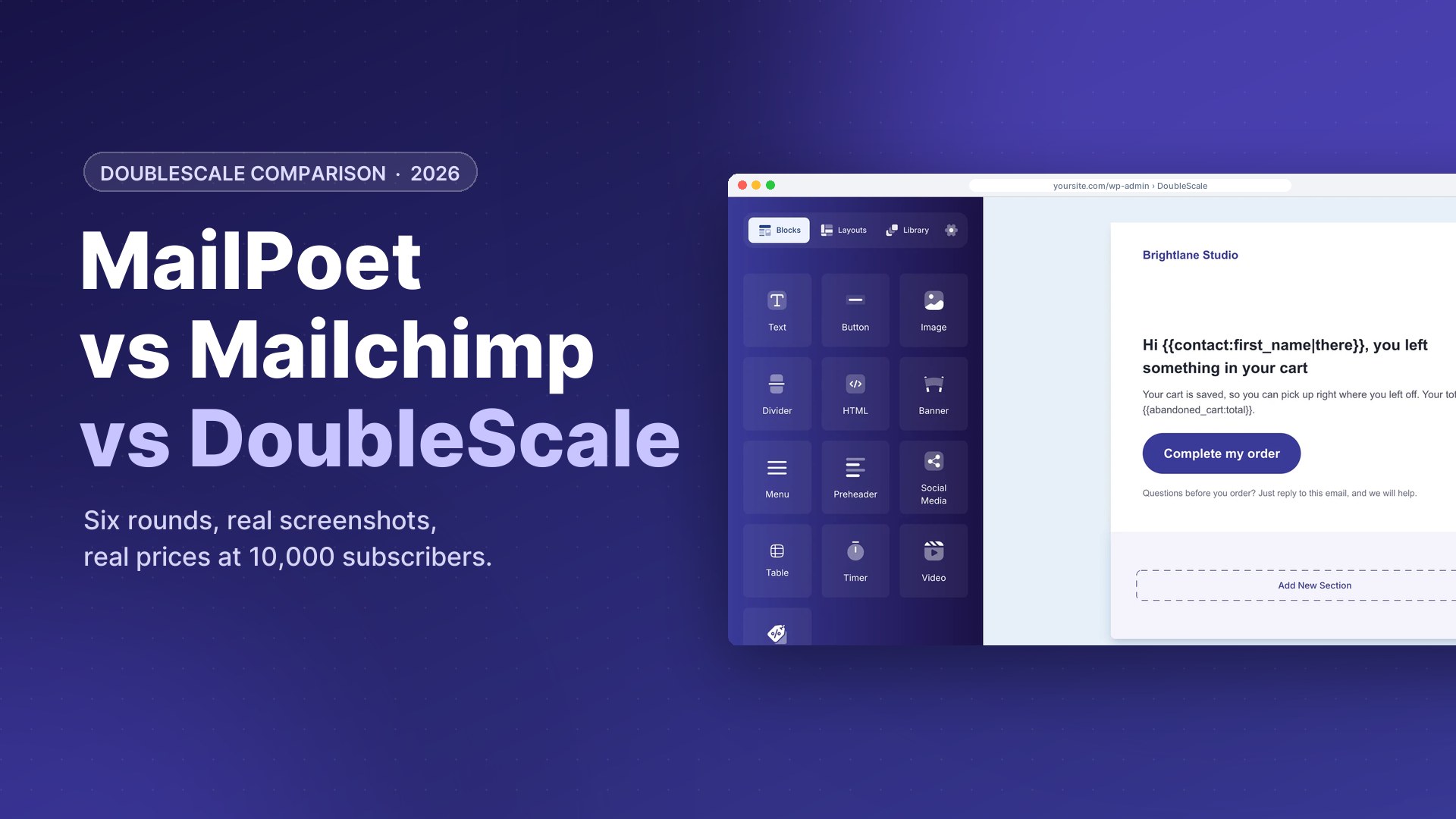
DoubleScale’s builder covers text and button blocks on the free plan, with merge tags that fall back gracefully (for example “Hi there” when a first name is missing). Pro adds 12 more blocks such as images, products, countdown timers and video, a pre-designed template library, saved headers and footers, and content blocks that show or hide per contact.
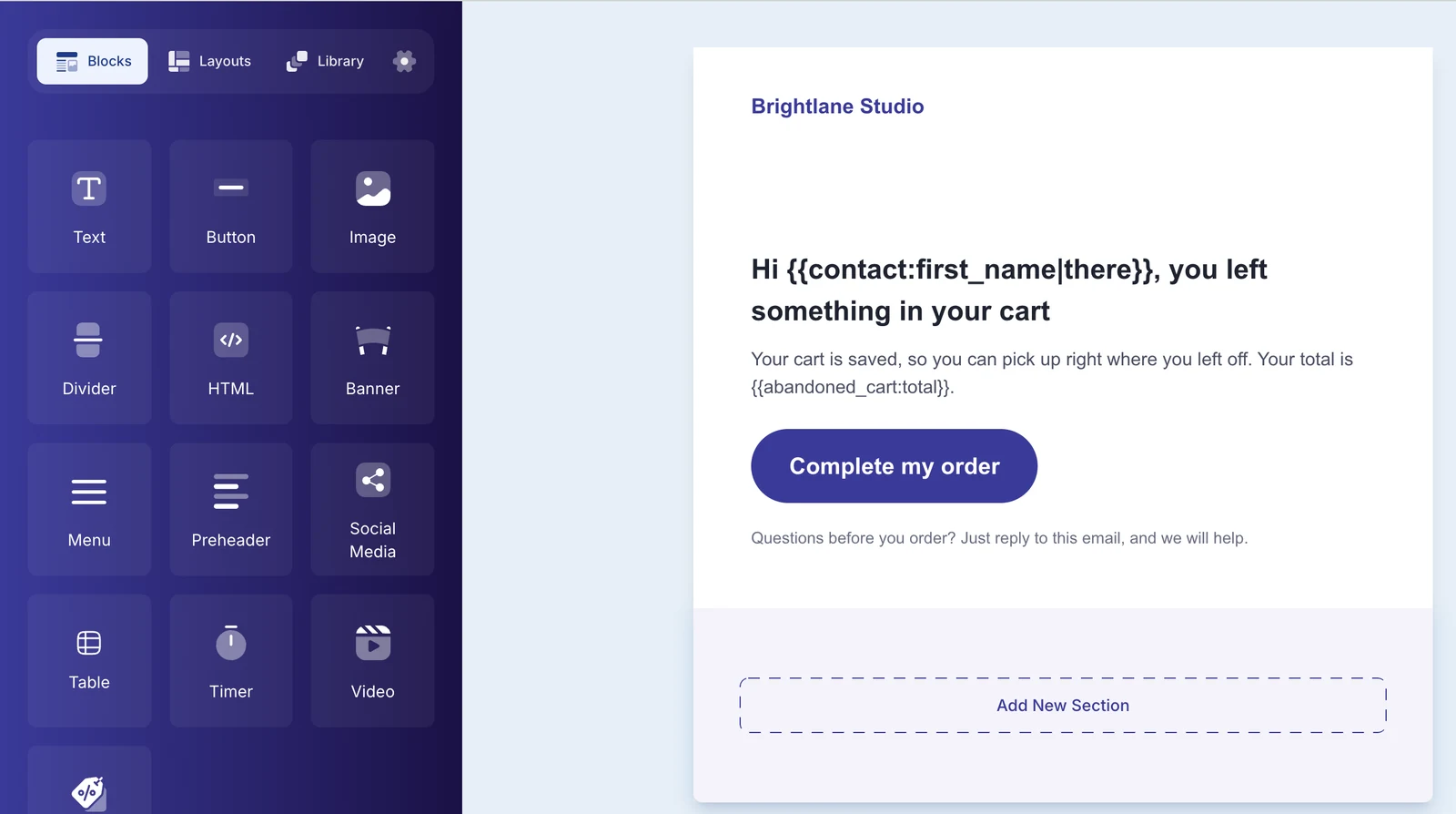
Round winnerMailchimp for the most design freedom. MailPoet wins on templates included for free.
Round 2: Choosing who gets it
MailPoet uses lists, plus engagement- and purchase-based segments on paid plans. Mailchimp has tags, segments and, on Standard, predictive segments and behavioural targeting.
In DoubleScale you choose recipients by lists and tags on the free plan, and the live counter shows exactly who will receive the email before you send: only subscribed contacts with a valid address are counted. Pro adds a rules builder that filters on any contact field, deal, booking or purchase.
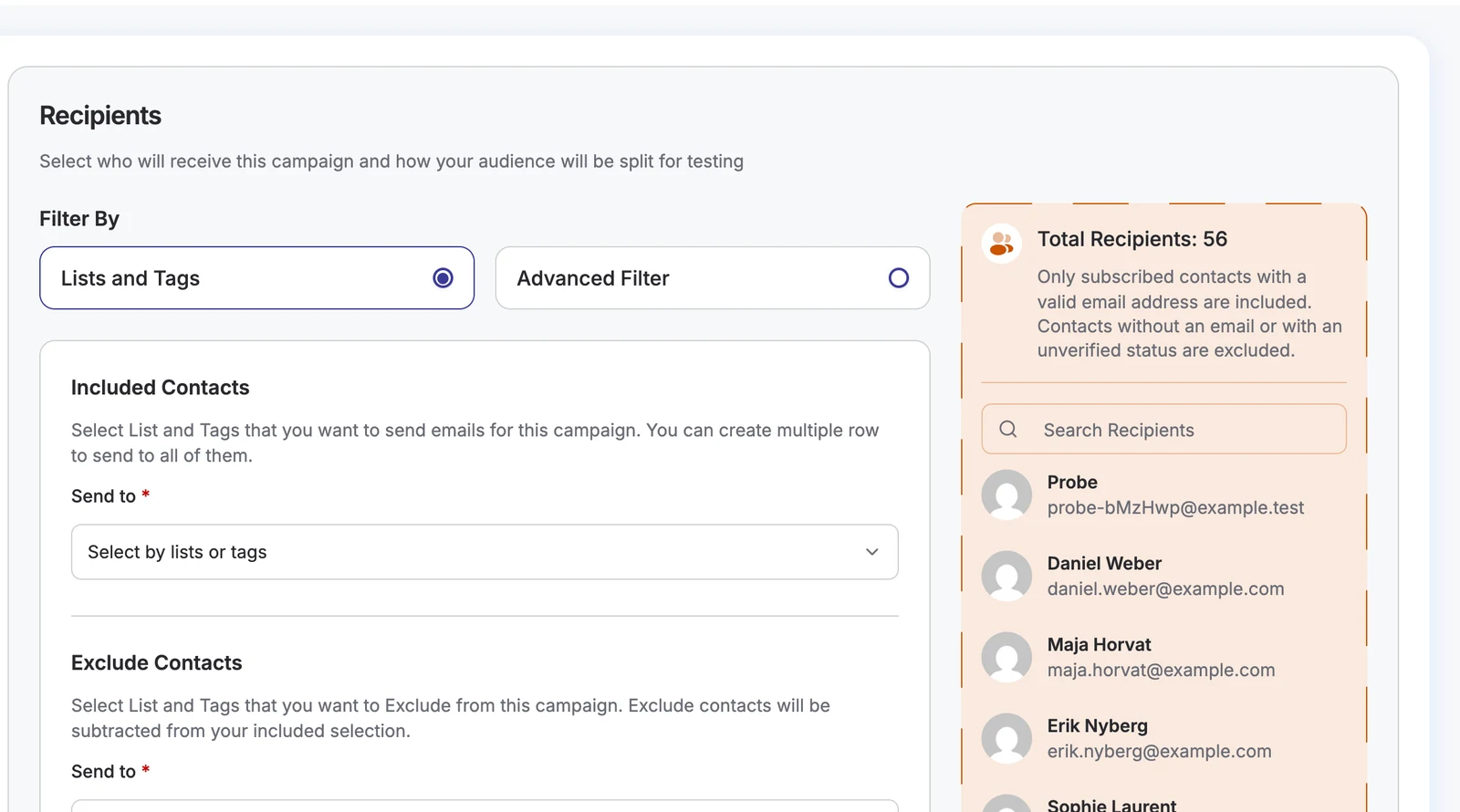
Round winnerMailchimp for predictive segments. DoubleScale is the only one that can target by deals, bookings or tickets.
Round 3: Automation
MailPoet automates the common things well: welcome emails, post notifications and WooCommerce flows such as abandoned cart and first purchase, with branching on paid plans. Mailchimp’s Standard plan gives you up to 200 flows with multiple starting points and branching.
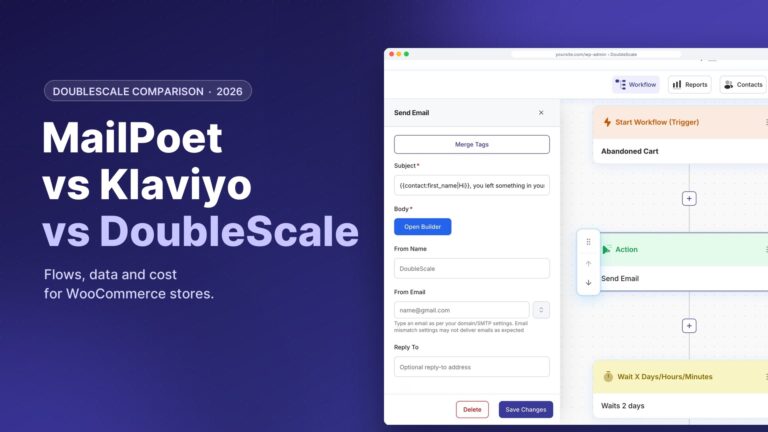
DoubleScale uses a visual workflow builder. The free version handles tags, lists and contact updates; Pro adds email and sequence actions, conditions, and triggers from WooCommerce, forms, deals, proposals, invoices, bookings, support tickets, LMS and membership plugins. Below, an abandoned cart workflow with its email step open.
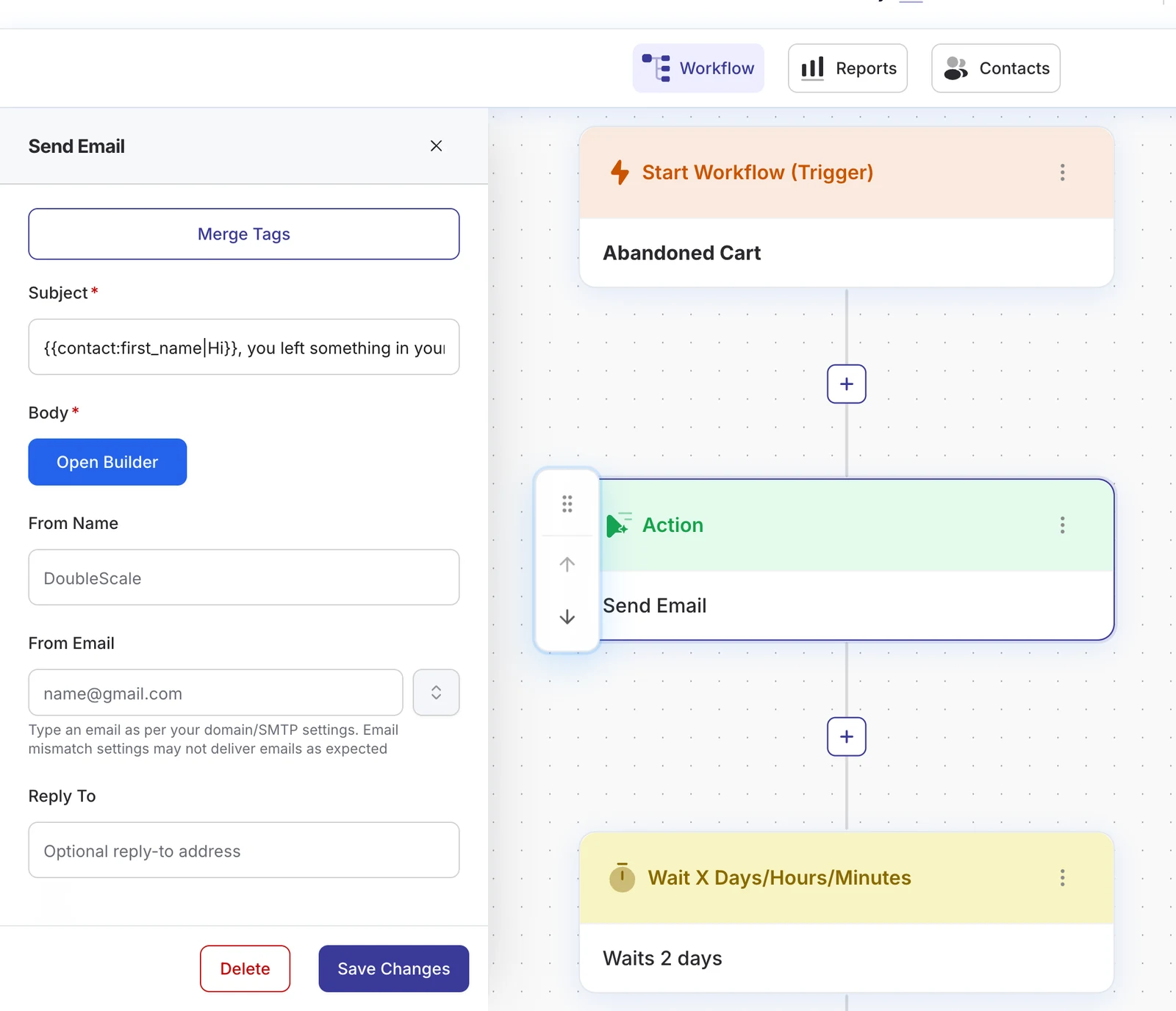
Round winnerTie: Mailchimp and DoubleScale Mailchimp for marketing journeys, DoubleScale for workflows that react to sales and support events.
Round 4: Sending and deliverability
Mailchimp sends for you. MailPoet gives you the choice: its own sending service, which it says handles more than 50,000 emails an hour, or your own SMTP.
DoubleScale always sends through a provider you connect. That is more setup, but it means your sending reputation and costs are yours. You can connect several providers (Amazon SES, Brevo, Mailgun, SendGrid, Postmark, Gmail, Outlook and more), set a default and a fallback, and get an alert if the main one fails. Every email is logged.
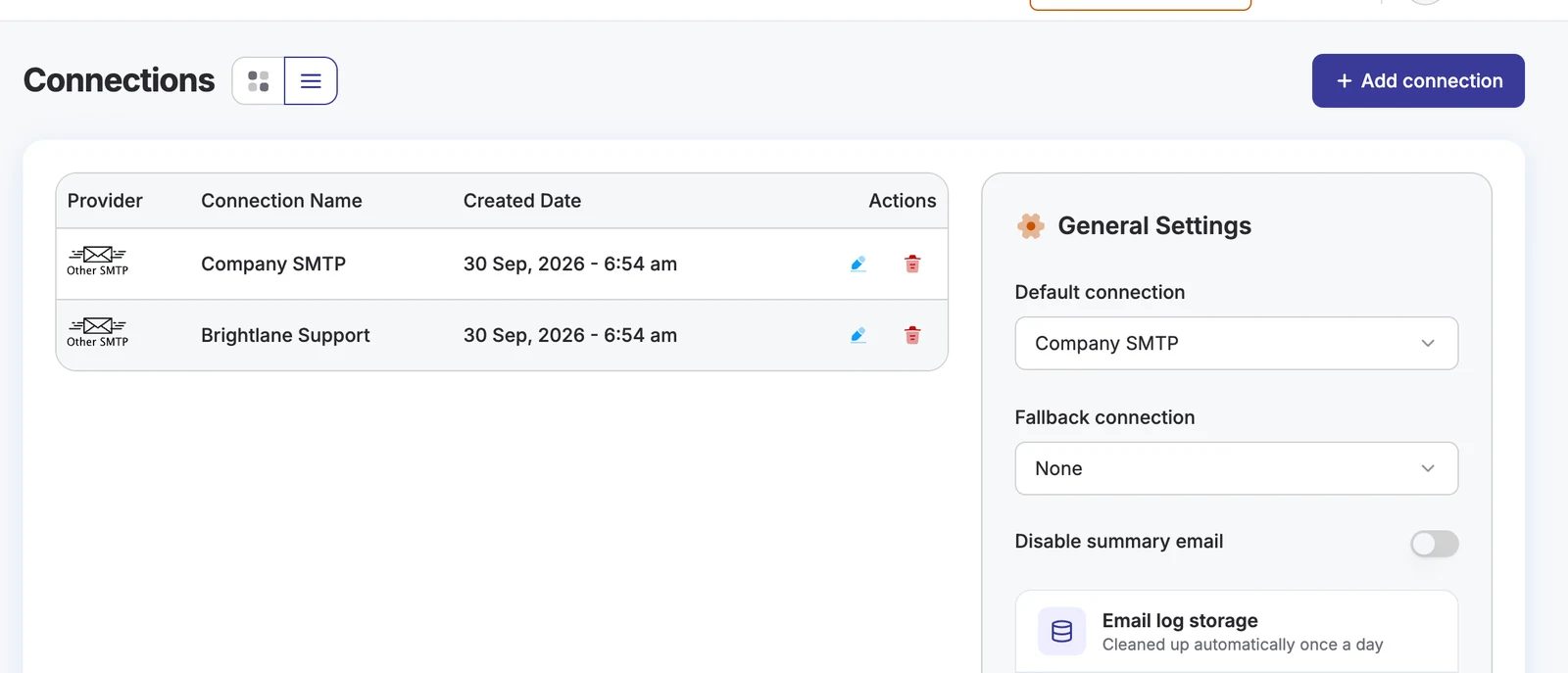
Round winnerMailchimp and MailPoet for zero-setup sending. DoubleScale for control and cost at scale.
Round 5: Reports
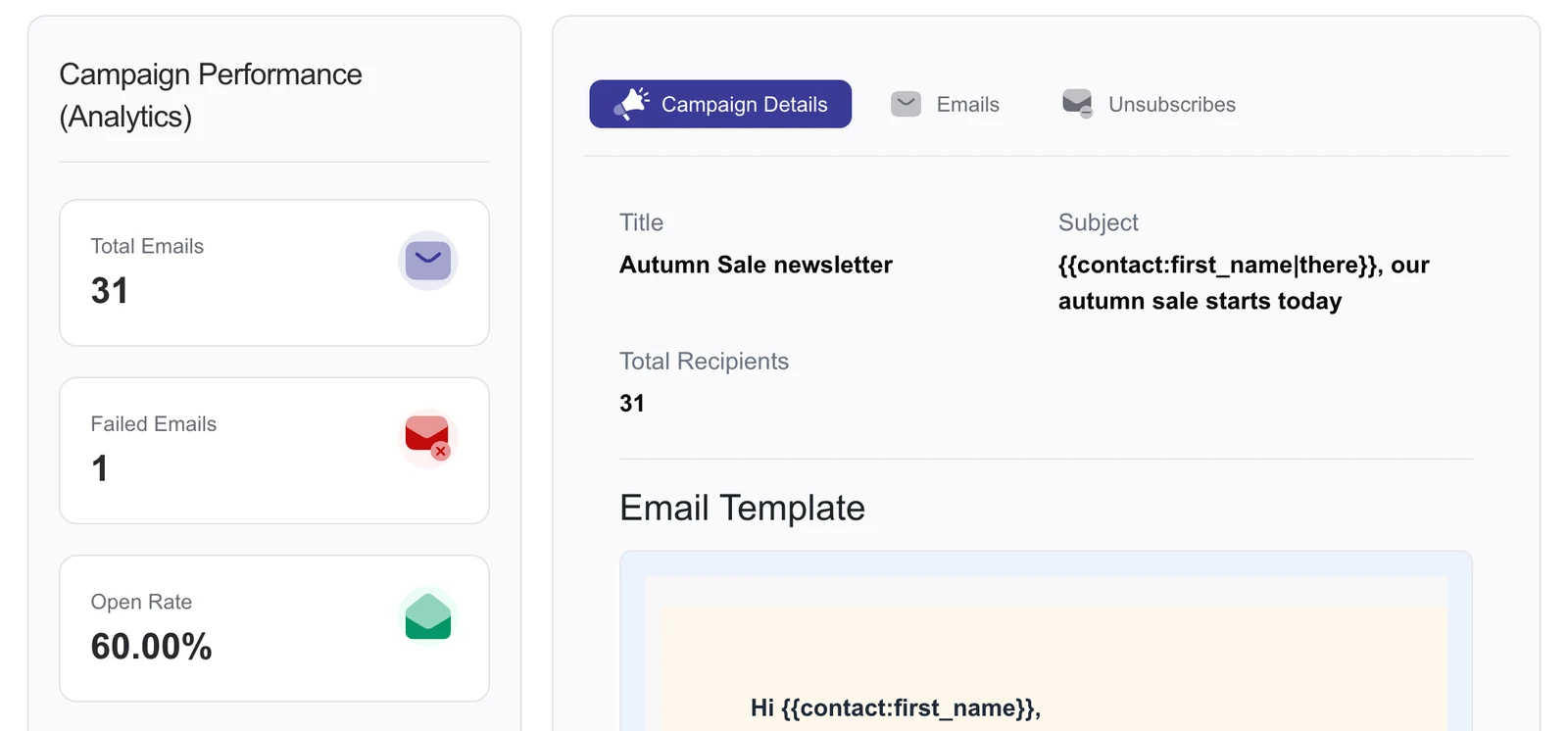
Mailchimp has the deepest reporting, including custom reports on Standard. MailPoet reports opens and clicks, with detailed engagement and WooCommerce revenue on paid plans. DoubleScale reports opens, clicks, failures and unsubscribes per campaign, and records each open and click on the contact’s timeline, next to their deals and tickets.
Round winnerMailchimp
Round 6: Everything beyond email
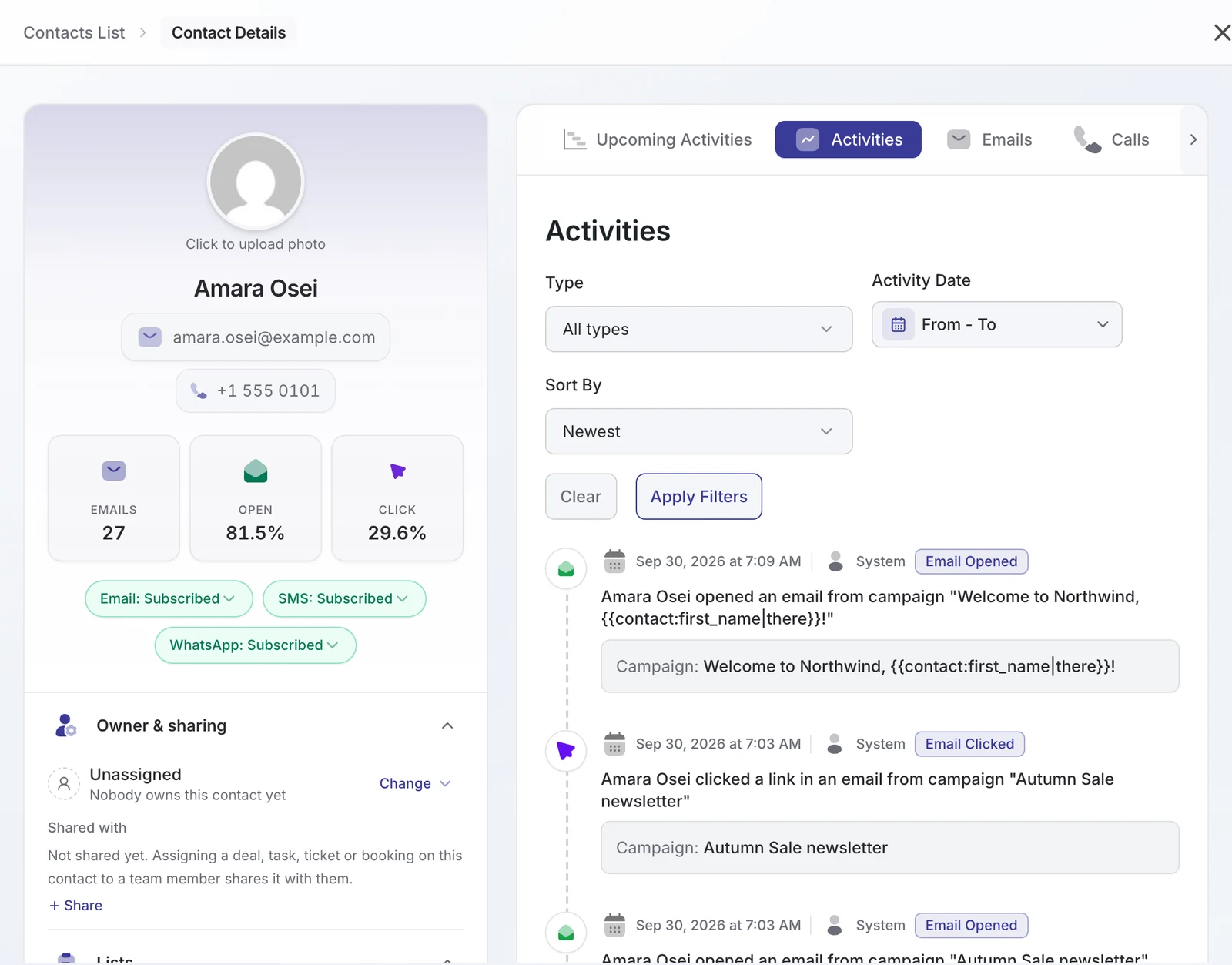
This is the round that decides it for many businesses. MailPoet is email only. Mailchimp has a light audience CRM. DoubleScale is a CRM first: every contact has a timeline with emails, SMS, WhatsApp, calls, deals, proposals, invoices, bookings and support tickets, and the free plugin already includes proposals, invoices, bookings, a client portal and a helpdesk inbox.
Round winnerDoubleScale
Round 7: Forms and list growth
MailPoet has its own form builder with popups, fixed bars, widgets and blocks below posts. Mailchimp offers hosted forms, pop-ups and landing pages, plus the MC4WP plugin for WordPress. DoubleScale connects to the form plugin you already use: Contact Form 7, WPForms, Fluent Forms and Quill Forms on the free plan, and 13 more, including Gravity Forms, Elementor Forms and Typeform, on Pro. A form submission can add tags and lists and start a workflow.
Round winnerMailchimp for landing pages; DoubleScale if your forms already exist.
Round 8: Privacy and data ownership
MailPoet and DoubleScale store contacts in your WordPress database, on your server. Mailchimp stores your audience on its US servers. All three support double opt-in and unsubscribe pages. If you need to answer “where is our customer data?” in one sentence, the WordPress plugins make that easy.
Round winnerMailPoet and DoubleScale
When DoubleScale is the wrong choice
- There is no built-in sending service. You connect your own provider (Amazon SES, Brevo, Mailgun, SendGrid, Postmark and more) and add its DNS records once.
- No A/B testing yet.
- We are new on WordPress.org, so there are fewer tutorials and community answers than for the big names.
- Automations that send email, sequences, automated campaigns, WooCommerce triggers, SMS and WhatsApp need a Pro plan (from $99 a year). The free automation builder handles tags, lists and contact updates.
- If you only send a monthly newsletter to a few hundred people, MailPoet’s free plan is simpler.
- If you are not on WordPress, Mailchimp is the obvious pick of the three.
Which one should you choose?
| If you… | Choose |
|---|---|
| Run a blog or small WordPress site and want newsletters today | MailPoet |
| Need A/B tests, predictive segments and a team-friendly platform | Mailchimp |
| Have a growing list and per-subscriber pricing hurts | DoubleScale |
| Sell services, send quotes or invoices, take bookings or answer tickets | DoubleScale |
| Are not on WordPress | Mailchimp |
Moving from MailPoet or Mailchimp to DoubleScale
- Install the free DoubleScale plugin and connect your sending provider (Amazon SES, Brevo or any SMTP).
- Export subscribed contacts from MailPoet or Mailchimp as CSV and import them, mapping lists and tags. See our Mailchimp migration guide.
- Point your forms at DoubleScale: Contact Form 7, WPForms, Fluent Forms and Quill Forms work on the free plan.
- Recreate your welcome email first, then the rest of your automations.
- Still like Mailchimp for campaigns? DoubleScale Pro can sync contacts to Mailchimp while you manage customers in WordPress.
Want the two-way breakdown without DoubleScale? Read MailPoet vs Mailchimp on the Quill Forms blog, or our own DoubleScale vs Mailchimp page.
How we compared: prices were read on each vendor’s pricing page on October 17, 2026 (USD, monthly billing unless noted); the cost examples assume 4 campaigns a month to the whole list; DoubleScale screenshots are from DoubleScale 1.6 on a test site.
FAQ
Is DoubleScale a Mailchimp alternative?
Yes, for WordPress sites. DoubleScale sends email campaigns, sequences and automations from inside WordPress with unlimited contacts, priced per site. Unlike Mailchimp, you connect your own sending provider and it has no A/B testing yet.
Is DoubleScale a MailPoet alternative?
Yes. Both run inside WordPress and keep subscribers in your database. MailPoet is simpler and includes a sending service; DoubleScale adds a full CRM (deals, invoices, bookings, helpdesk) and does not charge per subscriber.
Which is cheapest for 10,000 subscribers?
In our example of four campaigns a month, DoubleScale Basic with Amazon SES costs about $147 a year, MailPoet Business $960 and Mailchimp Essentials $1,320.
Does DoubleScale have a free plan?
Yes. The free plugin on WordPress.org includes unlimited contacts, standard email campaigns, the drag-and-drop builder, lists, tags, double opt-in and 20+ sending providers.
Do I need SMTP for DoubleScale?
Yes. DoubleScale sends through a provider you connect, such as Amazon SES, Brevo, Mailgun, SendGrid or Postmark, with an optional fallback connection.
Can I keep using Mailchimp with DoubleScale?
Yes. DoubleScale Pro can sync contacts to Mailchimp, so you can manage customers, deals and tickets in WordPress and keep sending campaigns from Mailchimp.
Does DoubleScale work with my existing forms?
Yes. Contact Form 7, WPForms, Fluent Forms and Quill Forms work on the free plan; Gravity Forms, Elementor Forms, Formidable, Forminator, Typeform, Jotform and more work on Pro.
Unlimited contacts, email campaigns and a CRM in one plugin. Upgrade only when you need automations and the Pro modules.

Mohamed Magdy, Founder & CEO, DoubleScale
Mohamed Magdy is the founder and CEO of DoubleScale, the all-in-one CRM for WordPress. He writes about CRM, email marketing and automation for WordPress businesses.
Practical CRM tips, once a month
Guides on growing with WordPress: lead capture, email marketing, automations and sales. No spam, unsubscribe anytime.