On this page
- What a WordPress ticketing system has to include
- Quick comparison
- 1. DoubleScale — WordPress helpdesk on your CRM
- 2. SupportCandy — popular self-hosted tickets
- 3. Awesome Support — the other WP classic
- 4. Fluent Support — tickets for the Fluent stack
- 5. Freshdesk — SaaS when you outgrow plugins
- How tickets flow in DoubleScale
- How to choose
- Frequently asked questions
A shared inbox is not a ticketing system. Neither is a contact form that emails info@ and dies in a thread. When two agents reply to the same customer, when nobody can find last month’s refund conversation, and when the CRM does not know the person who just opened ticket #184, you do not have a helpdesk — you have chaos with timestamps.
If you searched for a WordPress support ticket plugin or a WordPress ticketing system, you are usually choosing between:
- Standalone WordPress helpdesk plugins (SupportCandy, Awesome Support, Fluent Support) — tickets on your site, little or no CRM.
- SaaS helpdesks (Zendesk, Freshdesk, Help Scout) — mature SLAs and reporting, contacts living off WordPress. We already compared the Zendesk-shaped options in Zendesk alternatives for WordPress.
- A CRM-native helpdesk: tickets on the same contact as deals, orders, and emails, with a customer portal on your domain.
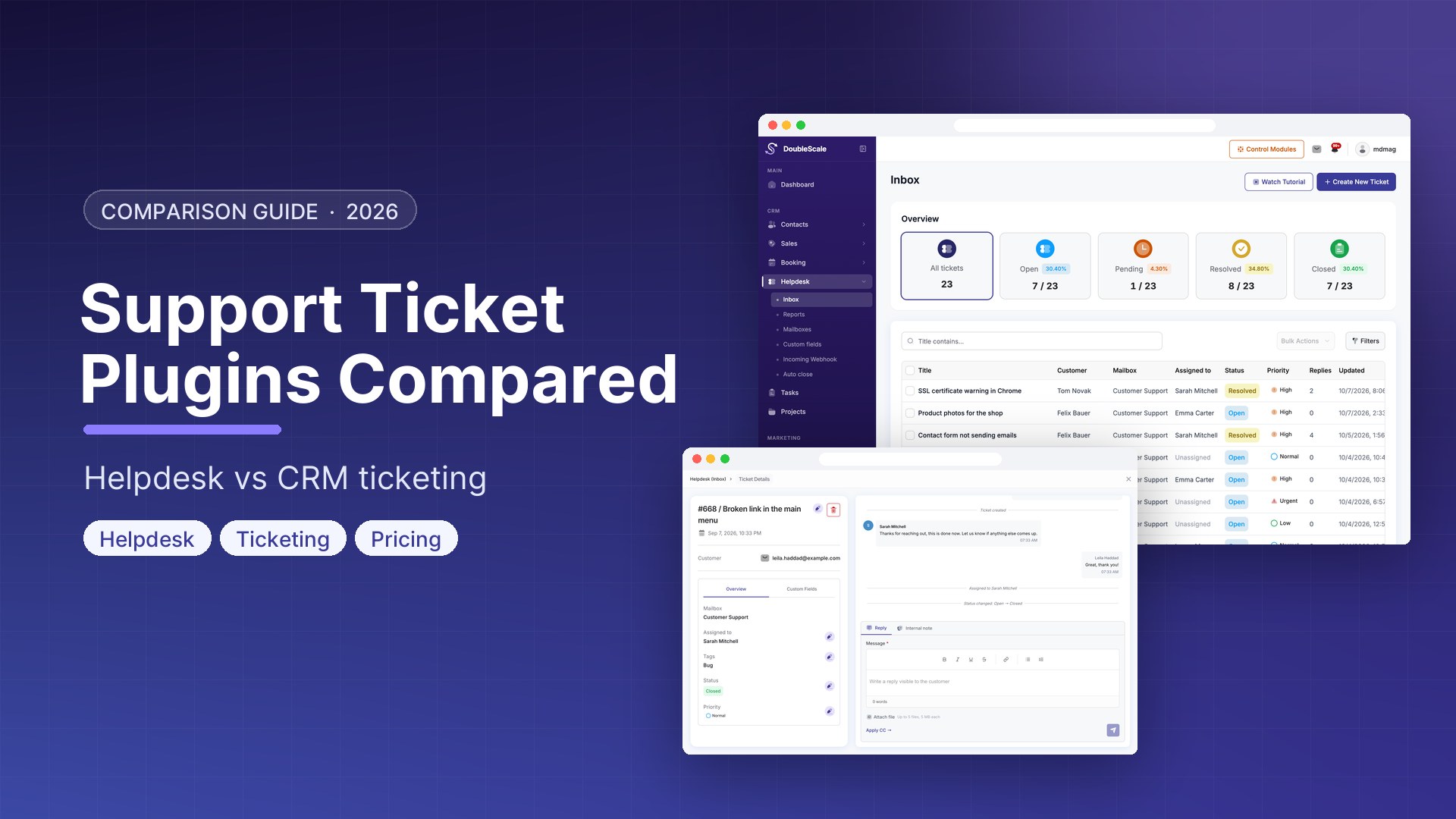
DoubleScale is the third model. The Helpdesk module ships in the free plugin: tickets, mailboxes, agent assignment, priorities, a customer portal, guest ticket links, internal notes, attachments, and reports. Pro adds email-to-ticket (IMAP), inbound webhooks, ticket custom fields, idle auto-close, and automation actions (create, assign, close, add a note).
This post is the plugin comparison. For the click-path inside DoubleScale, use the setup guide: how to set up ticket-based support in WordPress.
What a WordPress ticketing system has to include
A form notification is not a ticket. For this roundup, the helpdesk has to do the job a support lead would otherwise open Freshdesk to do:
- A ticket with status, priority, assignee, and a mailbox/channel
- A conversation the customer can see, plus internal notes they cannot
- A portal (logged-in) and a way for guests to reopen the same thread (hash link)
- File attachments that are not dumped into the media library for the world to guess URLs
- The ticket attached to a CRM contact — purchase history, tags, and previous tickets on the same person
- Email in both directions if you run support from
support@yourdomain.com
Zendesk and Freshdesk still win if you need SLA clocks, CSAT surveys, round-robin, and ITSM. DoubleScale does not claim those. It claims something WordPress teams actually need: tickets that are not a second database of customers.
Quick comparison
| Tool | Runs in WordPress? | CRM contact on the ticket | Customer portal | Email → ticket | Typical cost |
|---|---|---|---|---|---|
| DoubleScale | Yes — self-hosted plugin | Yes — shared CRM contact | Yes — portal + guest hash links | Pro (IMAP or inbox forward) | Helpdesk core free; Pro from $99/year |
| SupportCandy | Yes | WP users / add-ons | Yes | Paid extras | Free + premium |
| Awesome Support | Yes | WP users | Yes | Add-ons | Free + add-on stack |
| Fluent Support | Yes | Optional FluentCRM | Yes | Pro | Free + Pro |
| Freshdesk | No (embed / SSO) | Freshdesk contacts | Yes (Freshdesk) | Yes | Free tier, then per-agent SaaS |
| Help Scout | No | Help Scout customers | Docs + Beacon | Shared inbox model | Per-user SaaS |
1. DoubleScale — WordPress helpdesk on your CRM
Tickets live in DoubleScale, not in a parallel plugin with its own customers table. Opening a ticket resolves or creates a contact. Replies, notes, and system events sit on the activity timeline. Tags are the same CRM tags you already use on people.
Out of the box (free Helpdesk module):
- Statuses: open, pending, resolved, closed
- Priorities: low, normal, high, urgent
- Mailboxes as channels — web (portal/forms) on free; email channel on Pro
- Agent assignment, mailbox move, tags, bulk reply, bulk close
- Public replies vs internal notes; CC on replies
- Attachments with signed downloads (not public media files)
- Customer portal shortcode and a guest URL per ticket
- Reports: volume, agents, mailboxes, tickets over time
- Support Manager / Support Agent roles (helpdesk-scoped users do not need the whole CRM menu)
With DoubleScale Pro:
- IMAP polling (about every minute) or forwarding into the CRM inbox so email becomes a ticket
- HTTP webhooks to create or reply to tickets from other tools
- Custom fields on tickets
- Auto-close idle tickets on a daily job
- Automation actions — create, assign, close, delete, add a note — plus triggers for created, reply/note, status/priority change, assignment, and closed
What we will not pretend: DoubleScale is not Zendesk. There is no SLA timer, no CSAT survey, no round-robin engine, and no ticket-merge UI. The inbox is a table and ticket workspace, not a Kanban. If you need enterprise ITSM, stay on Zendesk. If you need WordPress tickets next to the WooCommerce customer and the deal, this is the plugin that actually shares the contact.
Download DoubleScale free · Launch a demo · Helpdesk setup guide
2. SupportCandy — popular self-hosted tickets
SupportCandy is the plugin most “WordPress helpdesk” roundups start with: unlimited tickets on the free tier, agents, a front-end form, canned replies on higher plans, SLA as a premium add-on. It is a real ticketing product. The customer is usually a WordPress user or an isolated helpdesk person — not your sales CRM contact with orders and campaigns attached.
Choose SupportCandy if you only want tickets and already have a CRM you refuse to change. Skip it if the support tab should open the same person your sales team is emailing.
3. Awesome Support — the other WP classic
Awesome Support has been around long enough that every agency has an opinion. Core is free; email piping, SLA, and extras are add-ons. You can make it work. You will also assemble a cart of licenses that starts to look like a SaaS bill, still without a native sales pipeline.
4. Fluent Support — tickets for the Fluent stack
Fluent Support is the clean modern option if you already run FluentCRM / Fluent Forms / Fluent Boards. Email piping and deeper CRM glue sit on Pro. You are committing to WPManageNinja’s suite. That is a valid WordPress strategy. It is not “one plugin for CRM + projects + tasks + helpdesk.”
5. Freshdesk — SaaS when you outgrow plugins
Freshdesk’s free tier (unlimited agents, basic tickets) is why it shows up in every Zendesk alternative list. SLA, automation, and a proper knowledge base are why teams stay. Contacts live in Freshdesk. WordPress is a form or a chat widget. Fine at 20 agents. Expensive and disconnected if your business already runs on WordPress.
How tickets flow in DoubleScale
- Enable the Helpdesk module. A Helpdesk menu appears in the DoubleScale app.
- Create a mailbox (department/channel). Web is enough for portal submissions. Switch the mailbox to email and add IMAP in Pro when
support@should mint tickets. - Customers open tickets from the support portal or the client portal Tickets section. Guests keep a hash link.
- Agents assign, set priority, reply (or leave an internal note), attach files, and close. Bulk actions cover reply, assign, move mailbox, tag, close, and delete.
- Optional Pro: auto-close tickets that went quiet; webhook intake from another app; automations that create a ticket when a form or WooCommerce event fires (via the contact).
There is no native ticket↔deal foreign key. If a support issue should spawn a sales follow-up, use an automation on the contact — the same pattern as CRM tasks.
How to choose
- If the ticket must show the same contact as orders and deals, pick a CRM helpdesk (DoubleScale), not SupportCandy alone.
- If you need SLA clocks, CSAT, and round-robin on day one, pick Freshdesk or Zendesk — be honest about the category.
- If email is the real inbox, confirm IMAP / piping is included (DoubleScale Pro, Fluent Support Pro, SupportCandy extras).
- If customers must track requests without wp-admin, require a portal and a guest link.
- If you already wrote a setup runbook, keep this comparison for “which plugin” and the setup guide for “how to turn DoubleScale on.”
Download DoubleScale free · Launch a demo · See Pro pricing
Frequently asked questions
What is the best WordPress support ticket plugin in 2026?
SupportCandy and Awesome Support are the usual standalone answers. Fluent Support fits the FluentCRM stack. DoubleScale is the option when tickets should live on the CRM contact — free helpdesk core, Pro for email piping and automation actions. It is not an ITSM suite.
Is DoubleScale helpdesk free?
The Helpdesk module (tickets, web mailboxes, portal, guest links, assignment, notes, attachments, reports) is in the free plugin. Email-to-ticket via IMAP, webhooks, ticket custom fields, auto-close, and support automation actions require DoubleScale Pro.
Can customers submit and track tickets without logging into wp-admin?
Yes. Use the support portal shortcode or the client portal Tickets section. Each ticket also has a public hash URL for guest access.
Does DoubleScale convert email into tickets?
Yes, on Pro: IMAP polling on an email mailbox, or mail forwarded into the CRM inbox. Outbound replies keep threading and a reply-to that routes back to the ticket. The free plugin can still run a web/portal helpdesk without IMAP.
Does it have SLA, CSAT, or round-robin?
No. Priorities and reports exist; SLA breach clocks, CSAT surveys, and automatic round-robin assignment do not. If those are mandatory, use a dedicated SaaS helpdesk and keep WordPress for the site.
How is this different from project management?
A ticket is a customer support conversation with statuses like open/pending/resolved/closed. A project is delivery work with a client board, tasks, and invoices. Many agencies run both: helpdesk for “something is broken,” projects for “we are building the thing.”

Mohamed Magdy, Founder & CEO, DoubleScale
Mohamed Magdy is the founder and CEO of DoubleScale, the all-in-one CRM for WordPress. He writes about CRM, email marketing and automation for WordPress businesses.
Practical CRM tips, once a month
Guides on growing with WordPress: lead capture, email marketing, automations and sales. No spam, unsubscribe anytime.