On this page
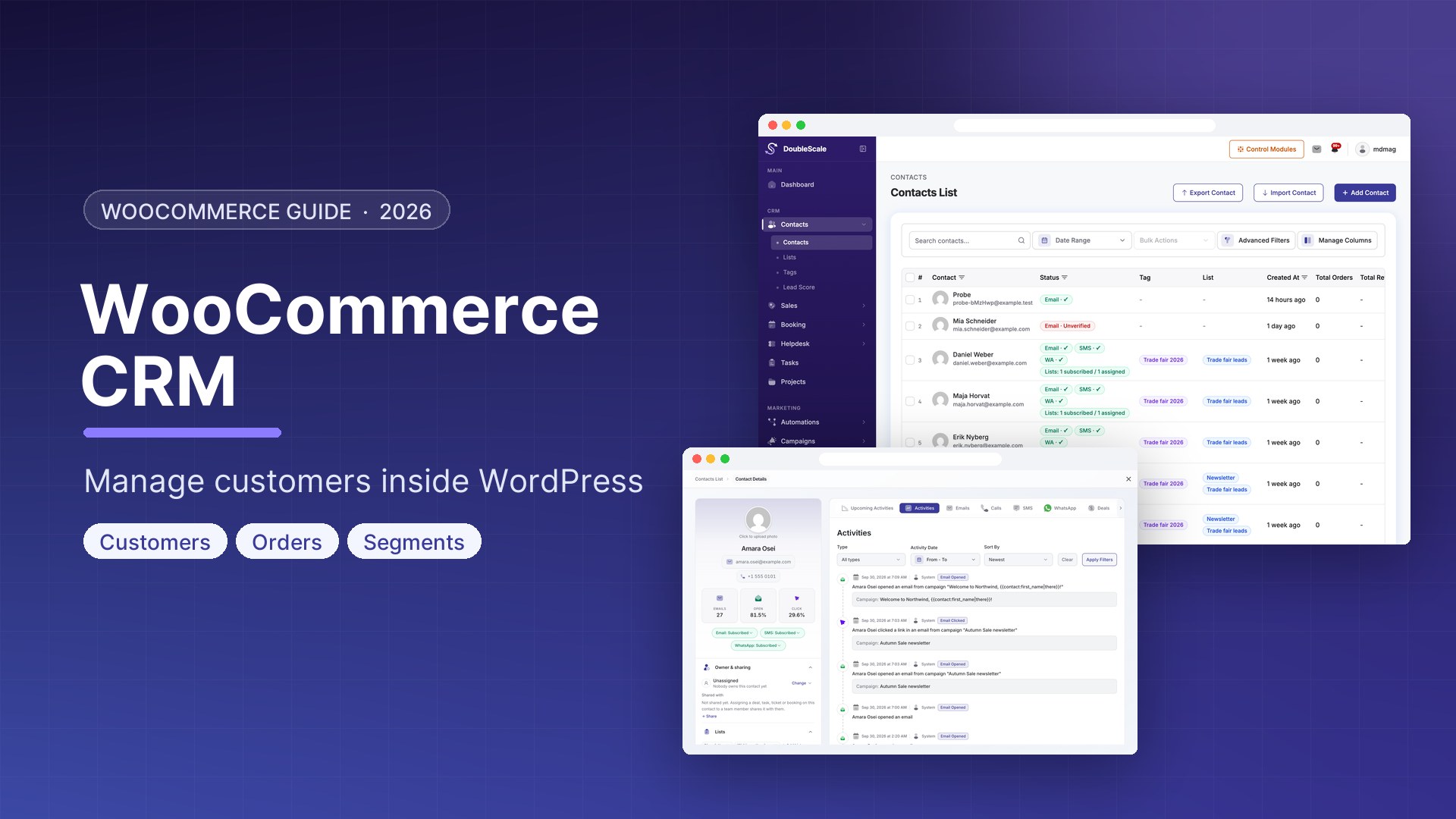
A WooCommerce CRM is the missing layer on most WordPress stores. WooCommerce records orders. It does not tell you who the customer is over time — how often they buy, which products they abandon, which emails they ignore, or when they are about to churn. DoubleScale is the WooCommerce CRM that keeps that history on the same WordPress site as the shop, then uses it to automate follow-up.
This guide shows how to manage WooCommerce customers inside WordPress with DoubleScale: what gets synced, which automations to turn on first, and how to segment buyers without exporting CSVs. For the full product view (WhatsApp, cart recovery, triggers), see the WooCommerce CRM integration page.
What is a WooCommerce CRM?
A WooCommerce CRM is a customer database connected to your store: contacts, order history, tags, conversations, and automations in one record. Spreadsheets and WooCommerce’s Customers screen are not that. Neither is a SaaS CRM that you pipe orders into with Zapier — you pay per contact and the data leaves WordPress.
DoubleScale installs as a WordPress plugin. When WooCommerce is active, store customers become CRM contacts, orders land on the timeline, and checkout events can start email, SMS, or WhatsApp workflows. There is no per-order SaaS fee. Paid plans start at $99/year with unlimited contacts.
Why WooCommerce stores need a CRM
WooCommerce tracks orders. It does not track customers. The difference is enormous: WooCommerce knows a customer placed Order #1047 for €89. A WooCommerce CRM knows that customer has placed 7 orders totalling €623, opened 12 of your 15 emails, abandoned a cart twice, and last visited the site 3 days ago.
With that picture you can do things WooCommerce alone cannot: send a personalised win-back campaign to customers who have not ordered in 60 days, reward your top 10% of spenders, or escalate a refund when lifetime value exceeds €500.
How DoubleScale connects to WooCommerce
The integration is automatic. When DoubleScale detects WooCommerce it registers store-specific automation triggers, maps customer data onto contact properties, makes WooCommerce merge tags available in templates, and can sync existing customers as contacts. You manage everything from the WordPress dashboard — the same place you already run the shop.
Install the free plugin on a staging copy of the store first, or use the live demo if you want to click through a WooCommerce CRM without touching production.
WooCommerce CRM automation triggers
| Trigger | When it fires | Typical use |
|---|---|---|
| Order created | Any new order | Add the customer to the CRM immediately |
| Order completed | Status changes to Completed | Post-purchase thank-you and upsell |
| Order refunded | Refund processed | Win-back offer |
| Subscription activated | New subscription starts | Onboarding sequence |
| Subscription renewed | Payment succeeds | Loyalty reward email |
| Subscription cancelled | Subscription cancelled | Save offer |
| Abandoned cart | Cart idle X minutes | Cart recovery sequence |
| Product purchased | Specific product in the order | Product-specific upsell |
| First order | First-ever purchase | New customer welcome |
Five WooCommerce CRM automations to turn on first
1. Post-purchase review request
Trigger: Order Completed → wait 3 days → send “How is your order?” with a review link → wait 7 days → if no review, send a second reminder and tag reviewers who reply.
2. Abandoned cart recovery (3-touch)
Trigger: Abandoned cart (60 min) → email reminder → wait 4 hours → if not purchased, WhatsApp → wait 18 hours → if still open, SMS with a code. Full setup: WooCommerce abandoned cart recovery.
3. Win-back for inactive customers
Daily check: last order more than 60 days ago and 2+ previous orders → “We miss you” email with recommendations → wait 7 days → final offer if they still have not purchased.
4. VIP customer recognition
Order Completed → lifetime value over €500 → tag VIP → send a VIP welcome → notify the team. Your WooCommerce CRM should treat high-value buyers differently from one-time checkouts.
5. Subscription churn prevention
Subscription cancelled → feedback email → wait 2 days → “here is what changed” → wait 5 days → win-back with a first-month discount.
How to segment WooCommerce customers in WordPress
- High-value: total spent over €300 and last order within 30 days
- At-risk: total spent over €100 and last order over 60 days ago
- New customer: order count = 1 and first order within 7 days
- Repeat buyers: order count 3 or more
These segments update as orders complete. A shopper moves from New to Repeat Buyer on the third order without a spreadsheet. That is the job of a WooCommerce CRM — not another report in WooCommerce Analytics.
WooCommerce CRM vs a cloud CRM
HubSpot, Klaviyo, and similar tools can ingest WooCommerce orders. The system of record is still their cloud, and the bill follows contact volume. DoubleScale keeps customers, deals, and campaigns in WordPress. If the store is already on WooCommerce, that is usually the simpler stack.
Compare plugins in the WordPress CRM roundup, or go straight to WooCommerce + DoubleScale for WhatsApp, cart recovery, and trigger lists.
Frequently asked questions
What is the best WooCommerce CRM for WordPress?
If you want the CRM on the same site as the shop, DoubleScale is built for that: contacts, automations, email, and optional SMS/WhatsApp without exporting buyers to a SaaS. Cloud CRMs win if you already live in HubSpot or Klaviyo and WordPress is only the storefront.
Does WooCommerce include a CRM?
No. WooCommerce stores orders, products, and a thin customer list. Lifetime value, segmentation, cart recovery sequences, and multi-channel follow-up need a WooCommerce CRM plugin (or an external tool).
Can I run a WooCommerce CRM without leaving WordPress?
Yes. DoubleScale is a self-hosted WordPress plugin. Customers and automations stay on your server. Start with the free plugin, then add Pro modules when you need WhatsApp, SMS, or advanced automations.
Download DoubleScale free · Try the demo · WooCommerce CRM features
Get our guides first on GoogleAdd DoubleScale as a preferred source and our articles show up more often in your Top Stories.

Mohamed Magdy, Founder & CEO, DoubleScale
Mohamed Magdy is the founder and CEO of DoubleScale, the all-in-one CRM for WordPress. He writes about CRM, email marketing and automation for WordPress businesses.
Practical CRM tips, once a month
Guides on growing with WordPress: lead capture, email marketing, automations and sales. No spam, unsubscribe anytime.