On this page
Invoicing proves the work was billed. A WordPress contract plugin proves the work was agreed: terms, a customer-facing page, a signature, a PDF, and a status that automations can see. Most WordPress sites fake this with a PDF in email and a folder named “signed.” That is not an audit trail.
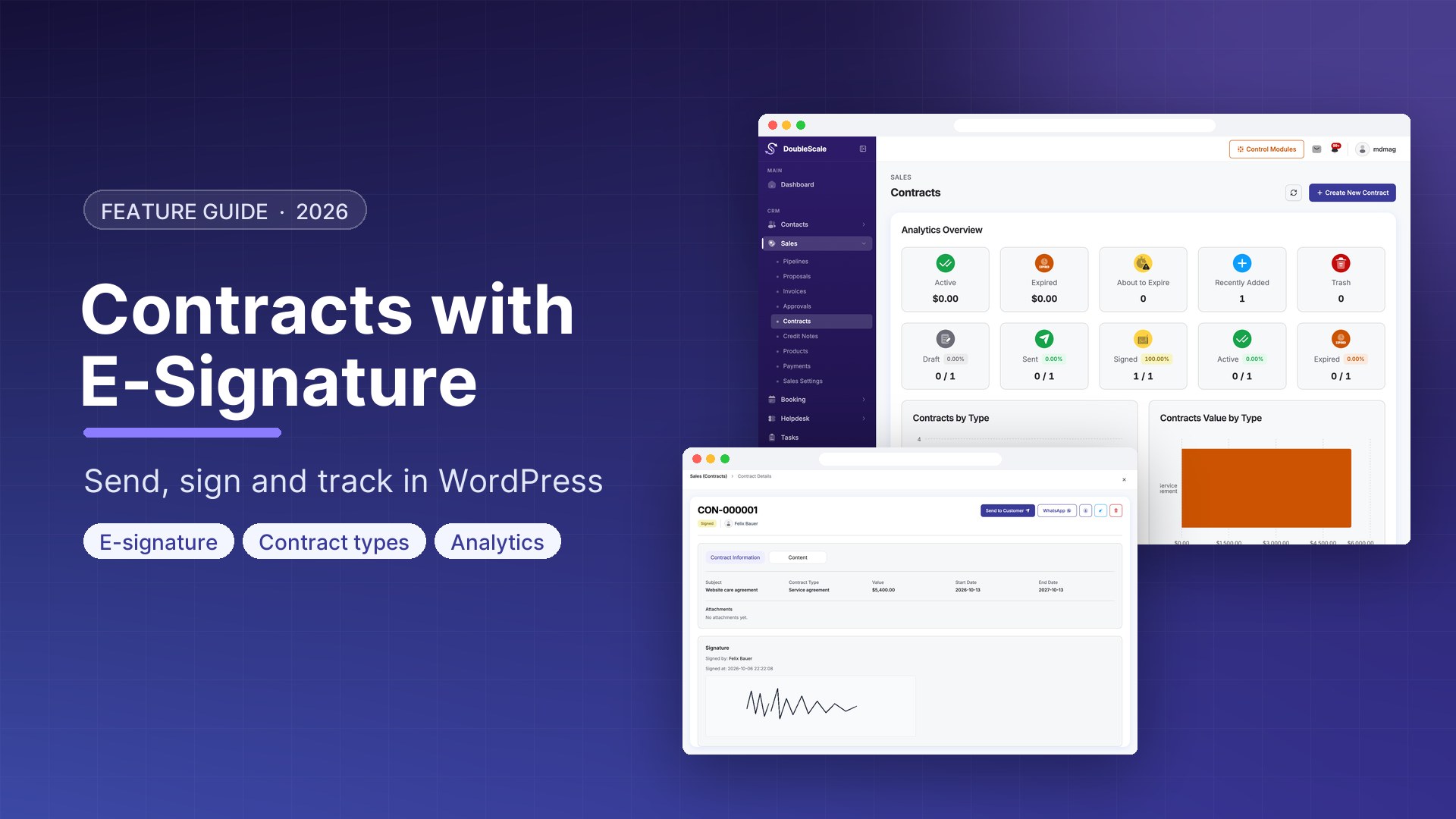
DoubleScale Pro adds Contracts under Sales: types, attachments, public hash URLs, e-signature, PDF, expiry, and a seat in the client portal Documents list. It is not DocuSign, not a multi-party closing room, and not the same module as invoices.
What a DoubleScale contract is
A contract belongs to a CRM contact, has a subject and value, an optional type, an assigned sales user, dates, and a status:
- Draft — staff-only, not shown to the customer
- Sent — public link issued
- Signed — customer signed on the public page
- Active — in force
- Expired — past end date (a daily job flips active contracts whose end date has passed)
You send it like an invoice: the customer gets an email with a link. The page is a WordPress page hosting /doublescale-contract/ if needed). The URL carries a 32-character hash, not the numeric ID.
E-signature, as implemented
On the public page the customer can view the contract, download a PDF, and open attachments. Signing hits /wp-json/doublescale/v1/sales/public/contracts/{hash}/sign. DoubleScale stores:
- Signed name
- Signature (the drawn/uploaded mark)
- Signed-at timestamp
- Signer IP, for the audit row
A sales setting, require signature on accept, defaults on: name and signature are both required. After sign, status becomes Signed, the sales rep is notified, the customer gets a signed confirmation email, and doublescale_sales_contract_signed fires for automations or custom code.
That is a first-party e-sign on your WordPress site. It is not a qualified electronic signature under eIDAS, not DocuSign Connect, and not countersign by three parties. If a bank or a government RFP requires a specific trust service, use that service and attach the PDF. If an agency needs “client signed the SOW on our site, we have name + mark + IP + time,” this module is the job.
Staff controls
- Types — classify contracts (retainer, SOW, NDA) without a second plugin.
- Attachments — files on the contract, downloadable from the public page via a file hash.
- Hide from customer — keep a record in the CRM without putting it in the portal Documents list.
- Merge tags — subject, number, value, URL, end date in emails and content.
- Assignment — a sales rep owns the record; people without “manage all sales” only see their own.
- Portal + calendar — non-draft, visible contracts appear as documents; end dates can show on the customer calendar.
Automations can filter on contract status, subject, value, and number — so “signed → create a project” or “expired → notify owner” is a CRM workflow, not a spreadsheet reminder.
Contracts vs invoices vs proposals
| Proposal | Invoice | Contract (Pro) | |
|---|---|---|---|
| Job | Offer the work | Collect money | Record the agreement |
| Customer action | Accept / decline | Pay | Sign (name + signature) |
| In free plugin? | Yes | Yes | No |
| PDF + public hash URL | Yes | Yes | Yes |
How to send the first one
- Install DoubleScale Pro. Open Sales → Contracts.
- Create a type if you want a label (optional). Create a contract on the contact, keep it Draft while you edit.
- Confirm a page contains
- Send the contract. Status becomes Sent. The customer opens the hash URL, reads, signs.
- When they sign, check Signed name / signed at / signature on the record. Move to Active when the term starts. The daily job will mark Expired after the end date.
Rate limiting applies on the public endpoints. Invalid or missing hashes show a placeholder, not another customer’s contract.
Download DoubleScale free · Launch a demo · See Pro pricing
Frequently asked questions
Is there a WordPress contract plugin with e-signature in a CRM?
DoubleScale Pro stores contracts on the CRM contact, sends a hash URL, collects name + signature + IP + timestamp, and keeps a PDF. It is a sales document, not a DocuSign replacement for regulated closings.
Are contracts in the free DoubleScale plugin?
No. Invoices and proposals are in the free Sales/Documents feature. Contracts, types, attachments, and e-sign are Pro.
Can two parties counter-sign?
The public sign action records one customer signature on the contract. There is no built-in multi-signer workflow or staff countersign ceremony in this module.
Do signed contracts show in the client portal?
Yes, unless the contract is a draft, trashed, or marked hide-from-customer. They appear in Documents and can show an end date on the portal calendar.
Can automations run when a contract is signed?
Yes. Signing fires doublescale_sales_contract_signed, and automation rules can match status, subject, value, and number. Typical follow-up: signed → create a project or a task for onboarding.

Mohamed Magdy, Founder & CEO, DoubleScale
Mohamed Magdy is the founder and CEO of DoubleScale, the all-in-one CRM for WordPress. He writes about CRM, email marketing and automation for WordPress businesses.
Practical CRM tips, once a month
Guides on growing with WordPress: lead capture, email marketing, automations and sales. No spam, unsubscribe anytime.