























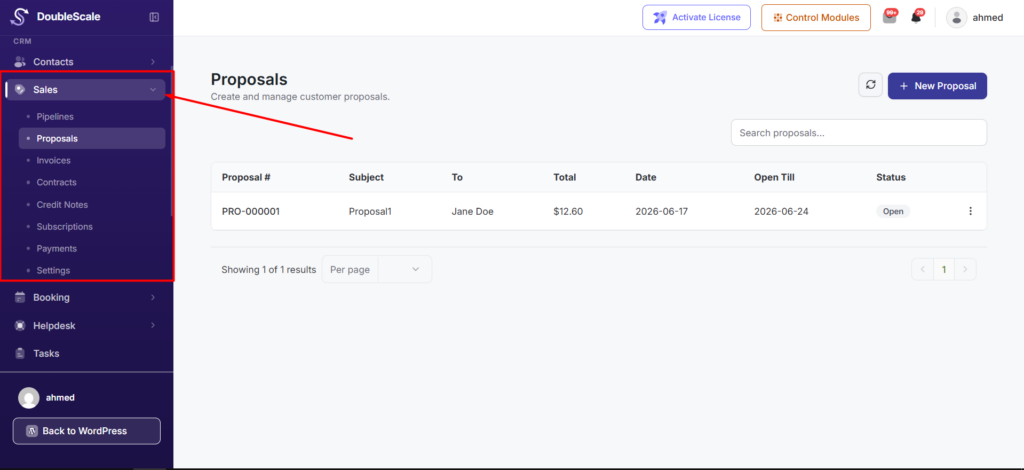
The Sales module is your revenue workspace inside DoubleScale. From one place in wp-admin, you can manage proposals, invoices, contracts, credit notes, payments, and sales settings—all linked to the same contact records, activity timeline, and automation engine.
What you can do in Sales
- Proposals — send branded quotes with line items; customers accept online and you can convert accepted proposals to invoices in one click.
- Invoices — bill customers, track status, and collect payment online (Stripe) or record manual payments.
- Contracts — send templated agreements for e-signature and trigger automations when signed.
- Credit notes — issue refunds and adjustments tied to invoices.
- Payments — view every payment recorded against invoices, including online and manual entries.
- Sales settings — configure email templates, taxes, payment gateways, PDF branding, and customer experience options.
How to open Sales
In your WordPress admin, open DoubleScale → Sales from the left sidebar. Depending on which modules are enabled, you land on the sales pipeline, proposals list, or contracts list.
Sales pipeline (deals)
Deal boards and pipeline stages live in the separate Pipeline category in these docs. Every deal links to a contact and can fire automations when stages change — for example, moving a deal to Closed Won can send an invoice or tag the contact.
Client portal
Customers with a WordPress login can use the embeddable client portal shortcode [doublescale_client_portal] to view proposals, invoices, contracts, outstanding balance, and payment history in one dashboard. Public secure links let buyers accept proposals, pay invoices, or sign contracts without logging in.
Permissions
Sales access is controlled by WordPress capabilities: View Sales, Manage Own Sales, and Manage All Sales. Sales settings require manage-all or CRM manager access.